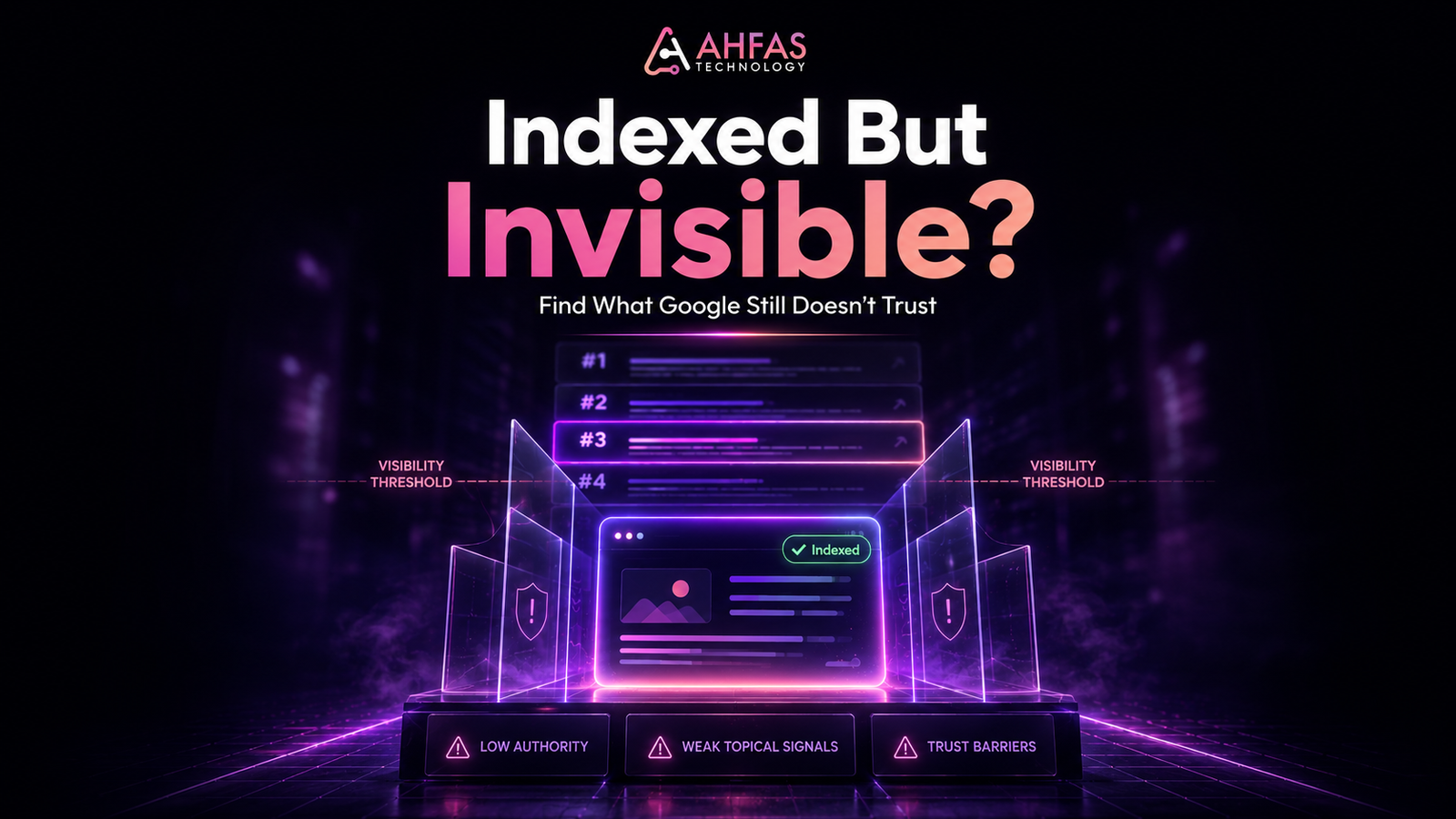
When your website is indexed but not ranking, Google has found your page, stored it, and made it eligible to appear in Search. But Google still may not rank it if the page lacks search intent match, content depth, technical clarity, internal links, authority, trust, or a strong reason to beat competing results.
In simple words: indexing means Google knows your page exists. Ranking means Google believes your page deserves visibility.
Google explains in its official guide on how Google Search works that crawling, indexing, and ranking are different stages. A page can pass the indexing stage and still fail to earn strong rankings.
The Real Problem
Your URL is indexed.
Google Search Console says the page is on Google.
But nothing useful happens.
No impressions.
No clicks.
No leads.
No ranking for the keyword you wanted.
That is where most business owners get stuck. They keep requesting indexing again, editing a few lines, or adding more keywords. But the real issue is usually deeper.
Google may know your page exists, but it may not trust it enough, understand it clearly enough, or consider it useful enough to show above better pages.
For a business website, this is not just an SEO issue. It is a visibility, trust, and lead generation issue. If your page is indexed but invisible, your website is present but not working hard enough for your business.
AHFAS Technology helps Karachi and Pakistan-based businesses identify this exact digital gap across SEO, website structure, content, branding, and conversion clarity through practical digital marketing services.
Fresh 2026 Search Reality
Search is no longer only about blue links.
Google’s AI Overviews and AI Mode have changed how users discover answers. Google’s official guide on optimizing for generative AI features in Search says that optimizing for AI features is still SEO. Google also says pages need to be indexed and eligible to show a snippet to appear in generative AI features.
A 2026 empirical study on Google Search, Gemini, and AI Overviews found that AI Overviews were generated for 51.5% of representative real-user queries in the study dataset. The study also found that AI Overviews can use different sources from traditional organic results, which means visibility now depends on clarity, crawlability, relevance, and source trust across both classic Search and AI-assisted search experiences.
That makes this topic more important. Your page cannot rely on indexation alone. It must be useful, clear, technically accessible, semantically strong, and trustworthy enough to deserve visibility.
Key Takeaways
- Indexing means Google discovered and stored your page. It does not guarantee rankings.
- A page can be indexed but receive no impressions if Google does not see it as relevant for real queries.
- Ranking depends on intent match, content quality, technical SEO, internal links, authority, and competition.
- Google Search Console helps you diagnose whether the issue is indexing, visibility, query relevance, or clicks.
- The fix is rarely “request indexing again.” Most pages need better structure, stronger content, clearer trust signals, and smarter internal linking.
Who This Guide Is For
This guide is for business owners, startup founders, marketers, ecommerce brands, local service providers, agencies, and website owners who already have pages indexed in Google but are not getting search visibility, traffic, or leads.
It is especially useful for Karachi and Pakistan-based businesses that have invested in a website but still ask:
- Why is my website not ranking?
- Why is Google indexing my page but not showing it?
- Why am I getting no impressions?
- Why does my competitor rank above me?
- Should I fix SEO, website design, content, or branding first?
If your website feels “live” but not visible, this guide will help you find what to fix first.
What Does Website Indexed But Not Ranking Mean?
Website indexed but not ranking means Google has added your page to its index, but the page is not appearing high enough in search results to generate useful impressions, clicks, or traffic.
Think of it like this:
Indexing gets your page into Google’s database.
Ranking gets your page in front of people.
Your page may be indexed, but Google may still decide that another page:
- answers the query better
- has stronger topical coverage
- loads faster
- has better internal links
- shows stronger authority
- provides more useful examples
- matches search intent more clearly
- gives users a better experience
Google’s official crawling and indexing documentation explains how Google discovers and stores pages. But being discoverable is not the same as being competitive.
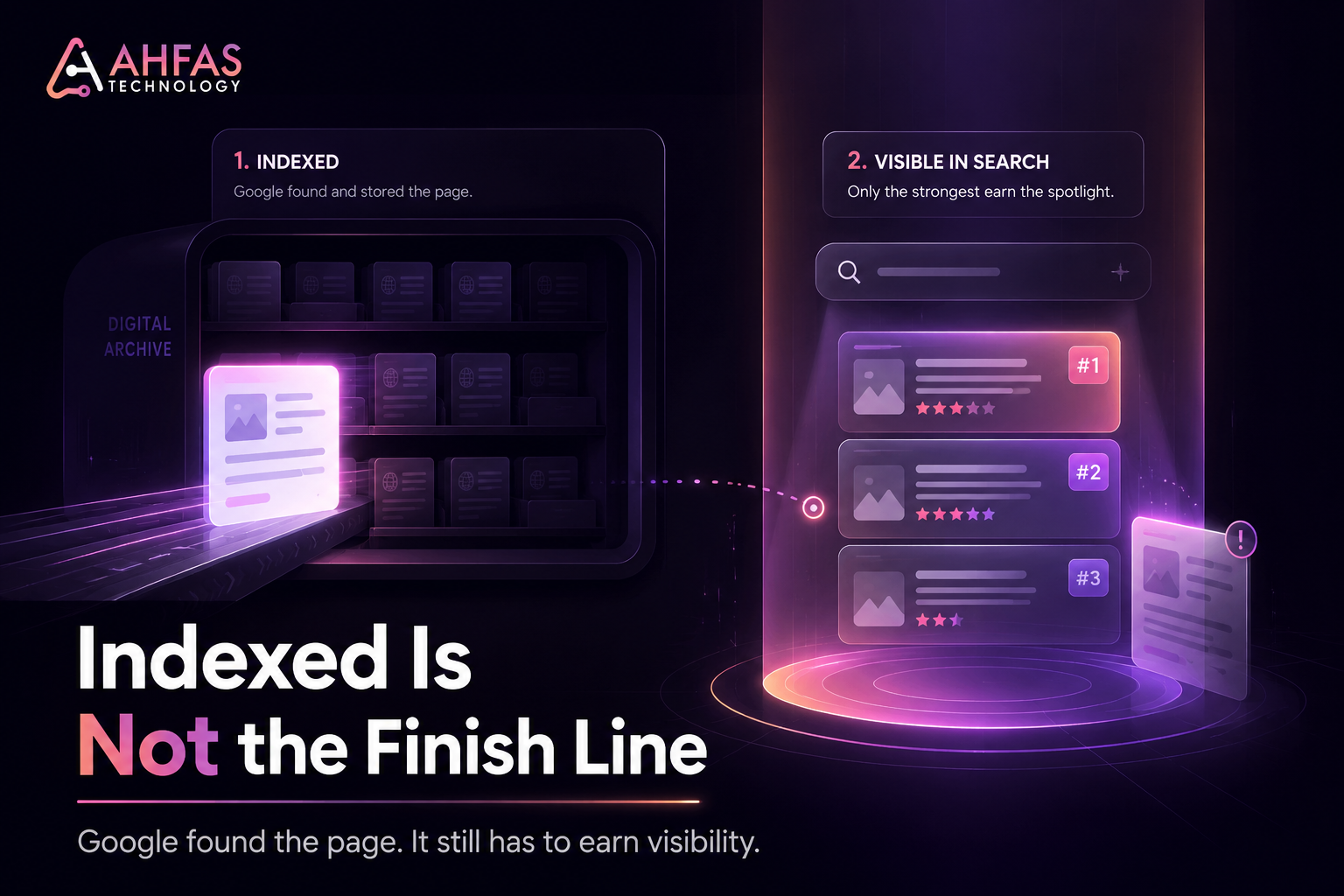
Google Indexing vs Ranking: The Difference That Matters
Indexing and ranking are connected, but they are not the same.
| Stage | What It Means | What It Means for Business |
| Crawled | Googlebot visited the page | Google found the URL |
| Indexed | Google stored the page | The page can appear in Search |
| Ranking | Google shows the page for queries | The page can get impressions |
| Ranking well | Google shows it high enough | The page can get clicks and leads |
| Converting | Users take action | The page supports business growth |
This is why “URL is on Google” does not mean “SEO is working.”
A page can be indexed but still rank on page 6, page 20, or not appear for the target keyword at all.
Google’s guide to Search ranking systems explains that ranking systems work at the page level using many signals to understand how pages should rank for different queries.
How to Confirm the Problem in Google Search Console
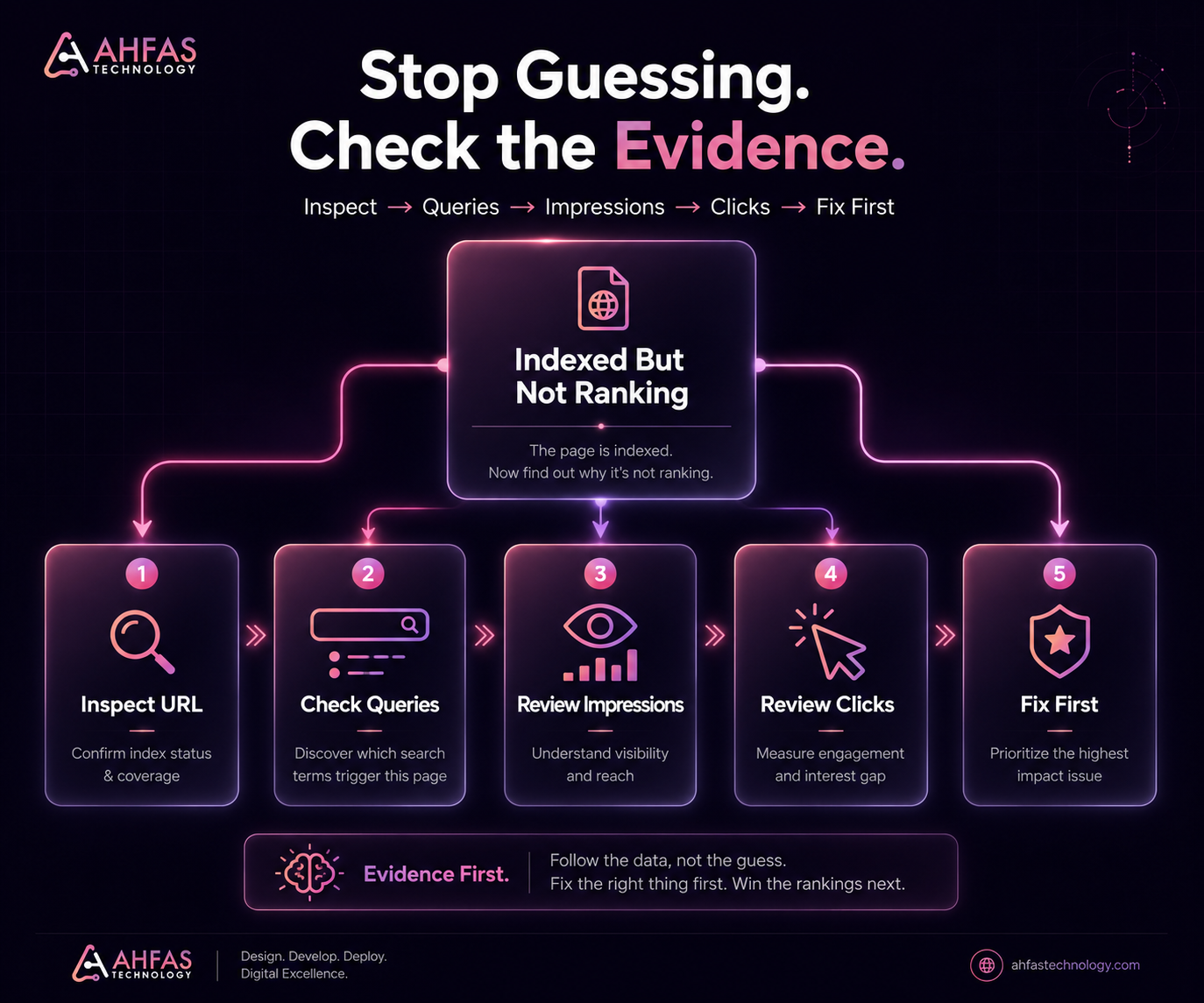
Before changing the content, confirm the issue with data.
Open Google Search Console and follow this process.
1. Use the URL Inspection Tool
Enter the exact page URL.
Check whether Google says:
- URL Is On Google
- URL Is Not On Google
- Crawled But Not Indexed
- Discovered But Not Indexed
- Alternate Page With Proper Canonical Tag
- Duplicate Without User-Selected Canonical
If the page is not indexed, you have an indexing issue.
If the page is indexed but not visible, you have a ranking, relevance, authority, or quality issue.
2. Open the Performance Report
Go to the Performance report and filter by the exact page URL.
Check:
- Impressions
- Clicks
- Average Position
- Queries
- Countries
- Devices
- Dates
3. Check the Queries Tab
This is where the real diagnosis starts.
If there are no queries, Google may not understand the page well enough or may not see enough relevance.
If the queries are irrelevant, your content targeting is unclear.
If the queries are relevant but position is low, your page may need stronger content, internal links, authority, or technical improvements.
4. Check Impressions vs Clicks
Use this simple logic:
| Data Pattern | What It Usually Means |
| No impressions | Google is not showing the page for meaningful queries |
| Impressions but no clicks | SERP title, meta, or position may be weak |
| Low position | Competitors have stronger content or authority |
| Wrong queries | Page targeting is unclear |
| Traffic drop | SERP changed, content aged, or competitors improved |
5. Check Manual Search Carefully
Do not only search your keyword manually.
Manual searches can vary based on:
- Location
- Device
- Personalization
- Language
- Search History
- Google Testing
- Ai Overview Presence
Google Search Console gives a more reliable view than checking rankings manually.
Quick Diagnosis Table
| Symptom | Likely Cause | What to Fix First |
| Indexed but no impressions | Weak relevance, wrong keyword, or low demand | Recheck search intent and keyword targeting |
| Indexed but no clicks | Poor title, weak meta, or low ranking | Improve SERP angle and content relevance |
| Indexed but ranking for wrong queries | Google does not understand the page clearly | Rewrite headings and content around one intent |
| Indexed but not ranking for target keyword | Competitors are stronger | Improve content depth and authority |
| Indexed but service page gets no leads | Weak conversion path | Improve proof, CTA, and offer clarity |
| Indexed but not ranking locally | Weak local relevance | Add location context and local trust signals |
| Indexed but traffic dropped | SERP changed or content became outdated | Refresh content and compare competitors |
| Multiple pages target same keyword | Keyword cannibalization | Merge, redirect, or differentiate pages |
The Fix First Framework
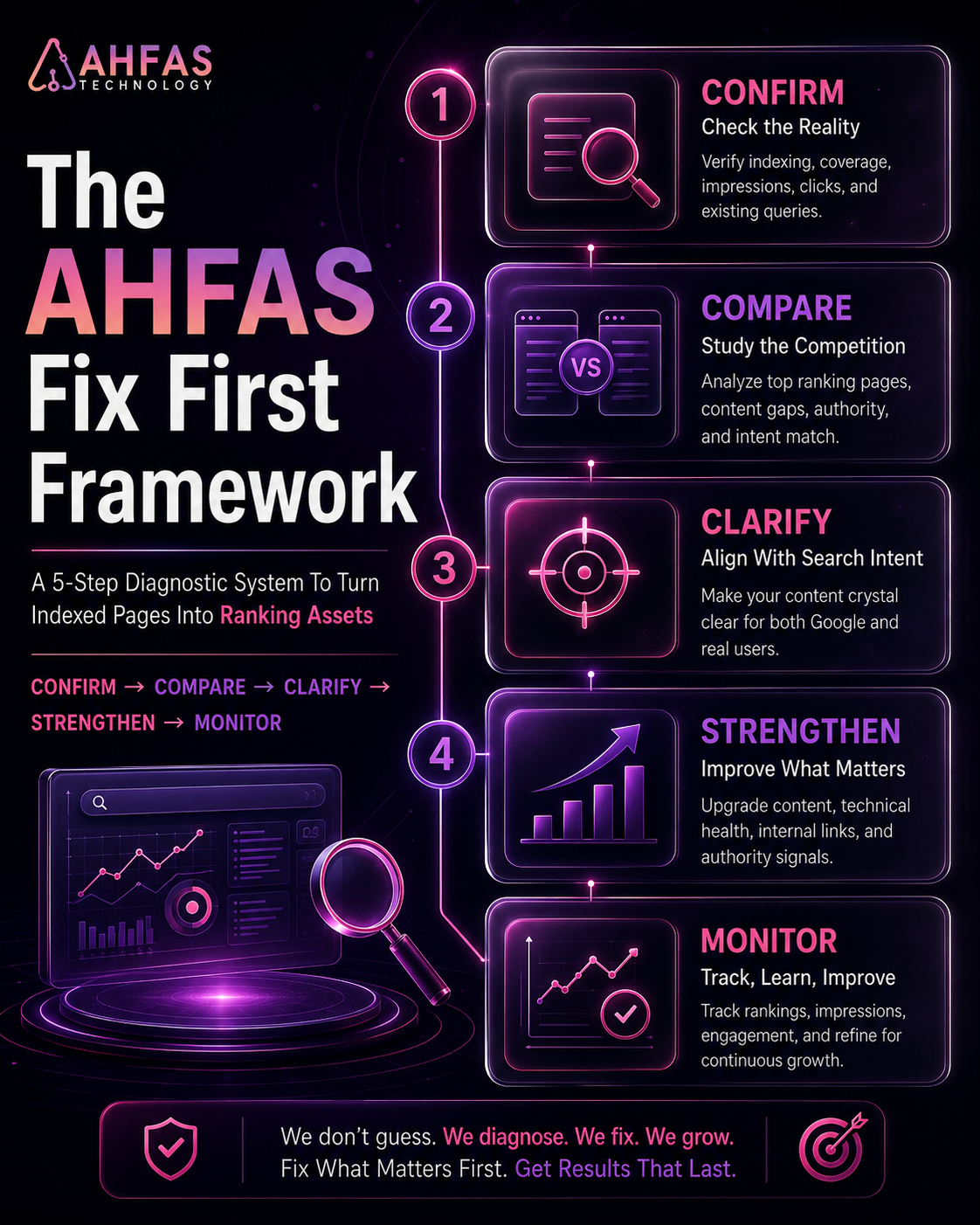
Before you rewrite the whole page or blame Google, use this framework.
1. Confirm
Check whether the page is indexed and whether it receives impressions.
2. Compare
Look at the top-ranking pages for your target keyword. See what they answer better than your page.
3. Clarify
Make the page’s search intent, heading structure, and main answer clear.
4. Strengthen
Improve content depth, technical SEO, internal links, trust signals, topical relevance, and page experience.
5. Monitor
Track impressions, clicks, average position, and query changes after Google recrawls the page.
This keeps you focused on the real blocker instead of making random SEO changes.
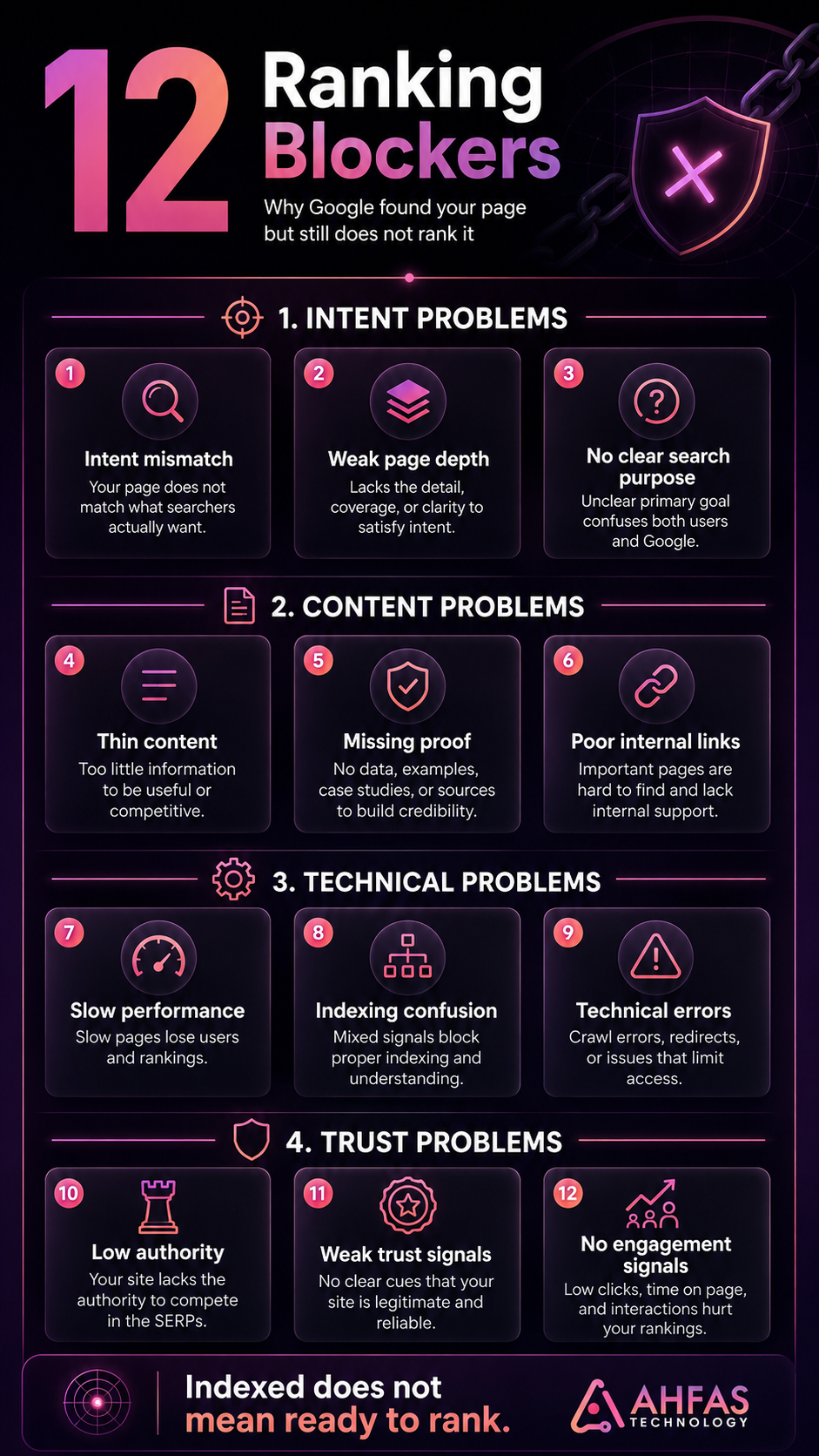
12 Reasons Your Website Is Indexed But Not Ranking
1. The Page Does Not Match Search Intent
If your page does not match what searchers want, Google has little reason to rank it.
Search intent is the real reason behind a query.
For example, someone searching “website indexed but not ranking” is not looking for a basic definition of SEO. They want to know:
- why Google is ignoring the page
- whether indexing means ranking
- how to check the issue
- what to fix first
- whether the problem is technical, content-based, or authority-based
If your page gives a shallow explanation but the user wants a diagnosis, the page may get indexed but not rank.
How to fix it
Search your target keyword and study the top results.
Ask:
- Are the ranking pages guides, tools, checklists, service pages, or forums?
- Do they answer the query directly?
- What questions do they cover?
- What examples or tables do they include?
- What is missing from them?
Then make your page more useful, not just longer.
2. The Content Is Too Thin or Generic
Thin content can be indexed, but it often fails to rank.
Thin does not only mean short. It also means the content lacks useful depth.
A weak page usually has:
- generic paragraphs
- no examples
- no clear diagnosis
- no original insight
- no practical steps
- no checklist
- no expert explanation
- no business context
- no helpful next step
Google’s guide on creating helpful, reliable, people-first content says content should primarily help people, not search engines.
That means your page should do more than mention the keyword. It should solve the problem completely.
How to fix it
Add:
- a direct answer
- symptoms
- causes
- priority fixes
- examples
- tables
- FAQs
- internal links
- next steps
- expert explanation
A strong page should make the reader think, “Now I understand what is actually wrong.”
3. The Page Targets the Wrong Keyword
Sometimes your page is indexed but not ranking because the keyword target is wrong.
This happens when the keyword is:
- Too Broad
- Too Competitive
- Not Searched By Your Audience
- Mismatched With The Page Type
- Already Targeted By Another Page
- Better Suited For A Service Page
For example, a blog should not target the exact same primary keyword as a service page.
A service page should own keywords like:
- SEO service in Karachi
- website development company in Karachi
- digital marketing services in Karachi
A blog should support those pages with diagnostic topics like:
- website indexed but not ranking
- website gets traffic but no leads
- SEO audit checklist
- Google Business Profile views but no calls
- service page not converting
That protects keyword architecture and reduces cannibalization.
AHFAS already has a dedicated SEO service in Karachi page, so this blog should support that page by educating problem-aware readers.
How to fix it
Map every important keyword to one page.
Use this rule:
| Keyword Type | Best Page Type |
| Direct service keyword | Service page |
| Cost keyword | BOFU blog |
| Checklist keyword | Blog |
| Troubleshooting keyword | Blog |
| Comparison keyword | MOFU blog |
| Brand keyword | Homepage or About page |
| Local money keyword | Local service page |
4. Your Website Has Weak Topical Authority
Google may index one page, but it also looks at the broader context of your website.
If your website has only one article on SEO and no connected supporting content, Google may not see enough topical strength.
Topical authority improves when your website covers related questions deeply and connects them with internal links.
For this topic, strong supporting content could include:
- SEO audit checklist for business websites
- technical SEO issues that hurt rankings
- why website traffic does not convert into leads
- internal linking guide for service websites
- service page copywriting checklist
- website redesign or SEO first
- local SEO mistakes in Karachi
- Google Business Profile views but no calls
AHFAS can build this kind of connected content system through content strategy help and SEO planning.
How to fix it
Build topic clusters.
Do not publish isolated blogs. Connect every blog to:
- a main service page
- related supporting blogs
- relevant case-style examples
- a clear next action
- a business problem
5. Internal Linking Is Too Weak
Internal links tell Google which pages matter and how your topics connect.
If a page is indexed but has few internal links, Google may treat it as less important.
Strong internal links help:
- pass authority between pages
- guide users to the next step
- explain page relevance
- support service pages
- reduce orphan content
- improve crawl paths
For example, this blog should naturally link to professional SEO support, digital marketing services, and content strategy help.
How to fix it
Add internal links from:
- relevant service pages
- older related blogs
- homepage sections
- resource pages
- category pages
- footer areas where useful
But do not overdo it. Internal links should help the reader, not look forced.
6. The Page Is Orphaned or Buried Too Deep
An orphan page has no internal links pointing to it.
Google may still find it through your XML sitemap, but if your own website does not link to it, the page looks less important.
A page can also be buried too deep.
Example:
Homepage > Blog > Category > Page 9 > Article
If users and search engines struggle to reach the page, rankings can suffer.
How to fix it
Make important pages easier to reach.
Link them from:
- main service pages
- related articles
- resource hubs
- homepage sections
- navigation if needed
- category pages
Your strongest content should not live alone.
7. Technical SEO Issues Are Holding It Back
A page can be indexed and still suffer from technical SEO problems.
Common technical blockers include:
- slow loading speed
- poor mobile experience
- broken links
- redirect chains
- wrong canonical tags
- duplicate URLs
- blocked resources
- JavaScript rendering issues
- weak heading structure
- missing structured data
- poor site architecture
Google’s SEO guide for web developers recommends using tools like URL Inspection and Rich Results Test to understand how Google sees your site.
How to fix it
Run a technical SEO audit before rewriting everything.
Check:
- crawlability
- indexability
- canonical tags
- sitemap status
- robots.txt
- mobile usability
- Core Web Vitals
- structured data
- redirects
- page speed
- internal links
If your website has technical issues, AHFAS can help with website development support and SEO-friendly website improvements.
8. Canonical or Duplicate Content Signals Are Confusing Google
Canonical tags help Google understand which version of a page should be treated as the main version.
If the canonical tag points to the wrong URL, Google may index your page but prefer another URL for ranking.
Duplicate content can also create confusion.
Common examples include:
- two service pages with similar content
- copied product descriptions
- multiple blogs targeting the same question
- tag pages competing with blog posts
- HTTP and HTTPS duplicates
- www and non-www duplicates
- location pages with nearly identical copy
This may not always cause a penalty, but it can split signals and reduce ranking clarity.
How to fix it
Check:
- canonical tags
- duplicate page titles
- duplicate meta descriptions
- overlapping blog topics
- similar service pages
- redirected URLs
- indexed tag or category pages
Then consolidate, rewrite, redirect, or differentiate pages where needed.
9. Core Web Vitals or Mobile Experience Is Poor
If your page is slow, unstable, or hard to use on mobile, it can hurt both rankings and conversions.
Core Web Vitals are part of the broader page experience conversation. They are not the only ranking factor, but they matter because users leave poor websites quickly.
Your page may lose users if:
- it loads slowly
- text is hard to read
- buttons are hard to tap
- layout shifts while loading
- contact forms fail
- WhatsApp buttons are hidden
- images are too heavy
- popups block the content
How to fix it
Use:
- PageSpeed Insights
- Lighthouse
- Google Search Console Core Web Vitals report
Then fix the issues that affect real users first.
For business websites, speed is not only a technical metric. It affects trust. A slow website makes visitors doubt the business before they even read the offer.
10. Competitors Have Better Content and Stronger Trust
Sometimes your page is technically fine, but competitors are simply stronger.
They may have:
- deeper content
- better examples
- stronger headings
- fresher updates
- clearer answers
- better internal links
- stronger backlinks
- expert authorship
- original screenshots
- stronger business trust
- better FAQs
- more useful page structure
Ranking is comparative. Google is not only asking whether your page exists. It is asking whether your page is the best available result for that query.
How to fix it
Do a SERP gap review.
Compare your page against the top-ranking pages and check:
- What do they answer that you do not?
- Do they use tables or checklists?
- Do they explain the issue more clearly?
- Do they include examples?
- Do they show stronger expertise?
- Do they answer follow-up questions?
- Do they have stronger trust signals?
Then improve your page with useful additions, not filler.
11. The Page Has Weak Authority Signals
Authority signals help Google and users trust your website.
A page can be indexed without strong authority, but competitive keywords usually need stronger support.
Authority can come from:
- backlinks
- internal links
- brand mentions
- reviews
- local citations
- expert content
- business listings
- case studies
- clear contact details
- consistent NAP information
- useful service pages
- helpful supporting blogs
For local businesses in Karachi, authority does not always mean thousands of backlinks. It can also mean clear business information, strong service pages, local relevance, customer proof, and consistent digital presence.
AHFAS Technology’s contact page shows local business details, including its Karachi address, phone number, and email, which are useful trust signals for local SEO and customer confidence. Businesses can contact AHFAS Technology directly for SEO, branding, website development, and digital growth support.
How to fix it
Strengthen trust signals across the site.
Add or improve:
- About page
- Contact page
- author information
- service page details
- FAQs
- reviews
- testimonials
- portfolio
- business address
- phone number
- Google Business Profile
- internal links to service pages
12. Google Needs More Time or Better Signals
Sometimes the issue is timing.
New pages, new websites, redesigned websites, and recently updated pages may need time before rankings settle.
But waiting only works if the page is already strong.
If the page has weak content, poor intent match, no internal links, slow loading, or confusing structure, time will not fix the issue.
How to fix it
Improve the signals first.
Then monitor:
- impressions
- clicks
- average position
- indexed status
- ranking queries
- crawl activity
- internal links
- competitor movement
Waiting is not a strategy unless the page already deserves to rank.
What Most Businesses Get Wrong
Most businesses think the solution is to request indexing again.
That is usually not enough.
Requesting indexing may help Google revisit the page, but it does not fix weak content, poor intent match, technical confusion, or lack of authority.
| Wrong Assumption | Reality |
| My page is indexed, so SEO is done | Indexing is only the starting point |
| I should keep requesting indexing | Reindexing does not fix weak ranking signals |
| More keywords will help | Better search intent match helps more |
| I need backlinks only | Content, UX, internal links, and trust also matter |
| Google is ignoring me randomly | Usually the page lacks relevance, quality, or authority |
| More blogs will fix everything | You may need better service pages first |
| My website looks good, so it should rank | Google needs clarity, structure, and usefulness |
The better question is not:
“Is my page indexed?”
The better question is:
“Does this page deserve to rank above what Google already shows?”
What to Fix First
Do not fix everything randomly. Start with the symptom.
If the Page Has Zero Impressions
Fix:
- Search intent
- Keyword targeting
- Page title
- Headings
- Content depth
- Internal links
- Topical relevance
If the Page Has Impressions but No Clicks
Fix:
- Meta title
- Meta description
- SERP angle
- Opening answer
- Freshness
- Benefit clarity
If the Page Ranks Low
Fix:
- Content gaps
- Competitor comparison
- Internal links
- Backlinks
- Topical authority
- Trust signals
- Page experience
If the Page Gets Traffic but No Leads
Fix:
- CTA clarity
- Service explanation
- Trust proof
- Contact options
- Page layout
- Offer clarity
- Conversion path
If Multiple Pages Target the Same Keyword
Fix:
- Keyword cannibalization
- Duplicate intent
- Internal link confusion
- Page consolidation
- Redirects where needed
If the Website Is Slow or Difficult to Use
Fix:
- Core Web Vitals
- Mobile layout
- Image size
- Hosting quality
- Ccripts
- Form issues
- Navigation
What This Means for Karachi and Pakistan-Based Businesses
Many Karachi businesses do not have only an indexing problem. They have a clarity and trust problem.
A page may be indexed but not ranking because it does not clearly explain:
- What the business offers
- Who the service is for
- Which location it serves
- Why customers should trust it
- What proof supports the claim
- What makes the business different
- How to contact the company
- What the visitor should do next
This is common for:
- Clinics
- Real estate companies
- Education businesses
- Restaurants
- Ecommerce brands
- Service providers
- Agencies
- Consultants
- Local contractors
Your website may not need more traffic first. It may need clearer service pages, stronger proof, better CTAs, faster loading, and a reason for visitors to trust you.
That is why AHFAS Technology focuses on finding the real digital blocker first. The issue may be SEO, content, website development, branding, social media, or a complete digital growth gap. You can request a digital gap review to understand what needs attention before spending more money on random marketing.
Indexed But Not Ranking Checklist
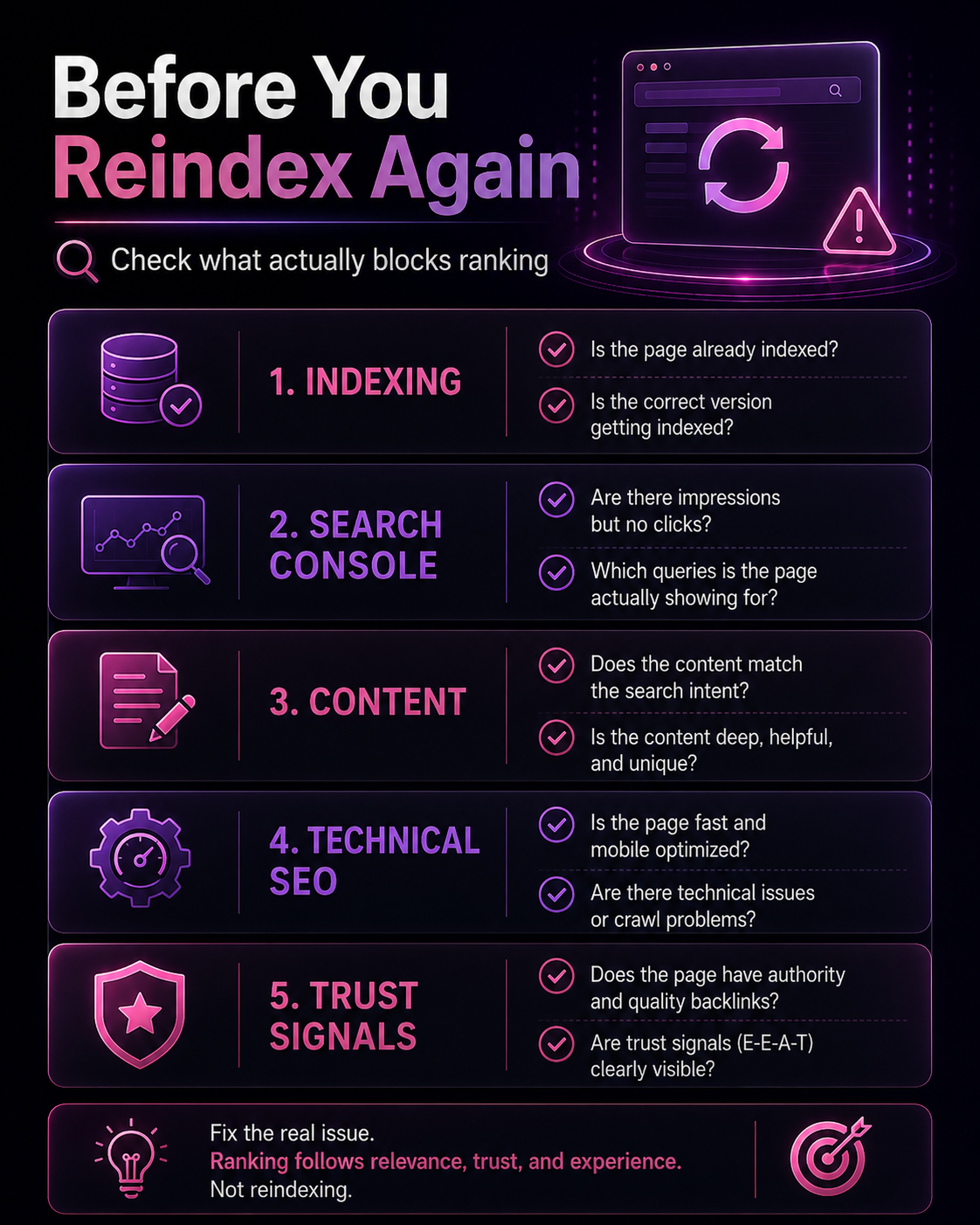
Use this checklist before deleting, rewriting, or republishing the page.
Indexing Check
- Is the URL indexed in Google Search Console?
- Is the correct page version indexed?
- Is the canonical tag correct?
- Is the page blocked by robots.txt?
- Is there a noindex tag?
- Is the page included in the XML sitemap?
- Is the page returning a 200 status code?
Search Console Check
- Does the page have impressions?
- Which queries trigger the page?
- Is the average position too low?
- Are clicks missing despite impressions?
- Is the page ranking for the wrong keywords?
- Did visibility drop after an update?
- Are mobile and desktop results different?
Content Check
- Does the page answer the main query quickly?
- Does it match search intent?
- Does it cover the topic fully?
- Does it include examples?
- Does it include a table or checklist?
- Does it provide original insight?
- Does it avoid generic filler?
- Does it help the reader decide what to do next?
Technical SEO Check
- Does the page load fast?
- Is the page mobile-friendly?
- Are headings clear?
- Are images optimized?
- Are there broken links?
- Is structured data used where relevant?
- Are important resources crawlable?
- Are redirects clean?
Authority Check
- Does the page have internal links?
- Does it link to the right service page?
- Does it have backlinks or mentions?
- Are trust signals visible?
- Is the business information clear?
- Is the content expert-led?
- Does the site show real contact details?
A Practical 7-Step Fix Plan
Use this if you want to improve an indexed page that is not ranking.
Step 1: Confirm the page status
Use Google Search Console URL Inspection to confirm the page is indexed.
Step 2: Check page-level performance
Filter the Performance report by URL and review impressions, clicks, queries, and position.
Step 3: Match the page to one primary intent
Do not make one page serve five different purposes. Decide whether the page is informational, troubleshooting, commercial, comparison, pricing, or service-focused.
Step 4: Rewrite the opening
Answer the main query in the first 80 words. Do not start with a generic introduction.
Step 5: Add missing depth
Add sections that cover symptoms, causes, fixes, examples, mistakes, FAQs, and what to do first.
Step 6: Strengthen internal links
Link the blog to the correct service page and link related blogs back to this page.
For this blog, the best service bridge is professional SEO support.
Step 7: Monitor changes
After updates, track:
- Impressions
- Clicks
- Ranking queries
- Average position
- Indexed status
- Conversions
- Service page visits
SEO is not only about ranking. It is about whether the page creates useful visibility that can lead to business action.
When to Get Professional SEO Help
Get professional help if your website has indexed pages but still struggles with:
- no impressions
- no organic traffic
- weak rankings
- confusing Search Console data
- keyword cannibalization
- technical SEO issues
- slow website performance
- poor local visibility
- weak service page conversions
- unclear website structure
- content that does not bring leads
AHFAS Technology provides SEO service in Karachi for businesses that need technical SEO, on-page optimization, off-page SEO, keyword strategy, website audits, and stronger search visibility.
You may also need website development support if the real blocker is speed, structure, user experience, mobile layout, or conversion flow.
If the issue is unclear messaging, weak page copy, or poor blog structure, content strategy help may be the smarter first step.
Conclusion
A website indexed but not ranking is not always a Google problem. It usually means the page needs stronger relevance, better content, clearer intent, stronger internal links, technical cleanup, better authority, or more trust.
Do not keep requesting indexing and hoping for rankings.
Start with Google Search Console. Check impressions, queries, clicks, and average position. Then compare your page against top-ranking results and improve what actually matters.
Google may already know your page exists. Now your page needs to prove why it deserves to rank.
Not sure why your website is indexed but still invisible on Google?
AHFAS Technology can review your SEO, content, technical setup, internal links, website structure, page speed, and trust signals to find what is blocking your visibility.
Start with a practical diagnosis before spending more on random marketing. Request a digital gap review and fix the right thing first.
FAQs
1. Does indexed mean my page should rank?
No. Indexed means Google has stored your page. Ranking means Google chooses to show it for a specific search query. A page can be indexed but still rank very low or not appear for your target keyword.
2. Why is my website indexed but not ranking?
Your website may be indexed but not ranking because of poor search intent match, weak content, low authority, limited internal links, technical SEO issues, keyword cannibalization, duplicate content, or stronger competitors.
3. Why is my indexed page getting no impressions?
If an indexed page gets no impressions, Google may not see it as relevant for real searches. The keyword may also have low search demand, or the page may not be strong enough to compete.
4. Can a page be indexed but not visible on Google?
Yes. A page can be indexed but rank so low that users rarely see it. It may also appear for different queries than the keyword you are manually checking.
5. How do I check if an indexed page is ranking?
Use Google Search Console. Open the Performance report, filter by the exact page URL, then review queries, impressions, clicks, and average position.
6. How long does it take for an indexed page to rank?
There is no fixed timeline. Some pages rank quickly, while others need stronger content, better internal links, technical SEO improvements, authority signals, or more time for Google to reassess them.
7. Can thin content be indexed but not rank?
Yes. Google may index thin or generic content, but it may not rank well if it does not satisfy search intent or provide enough unique value.
8. Do backlinks matter after indexing?
Yes. Backlinks, internal links, brand mentions, and authority signals can help Google understand the importance and trustworthiness of a page, especially for competitive searches.
9. Can technical SEO stop an indexed page from ranking?
Yes. Slow speed, poor mobile usability, canonical issues, duplicate URLs, broken links, blocked resources, and weak site architecture can limit ranking performance even if the page is indexed.
10. What is the fastest way to fix an indexed page that is not ranking?
Start with Google Search Console. Check whether the page has impressions, what queries it appears for, and where it ranks. Then fix search intent, content depth, internal links, technical issues, and trust signals based on the data.