Cheap quote. Fast launch. No admin access.
Six months later, every small update needs a developer. The website feels slow, paid plugins are expiring, and adding one important feature may require rebuilding half the site.
That is the real risk behind the WordPress vs custom website decision.
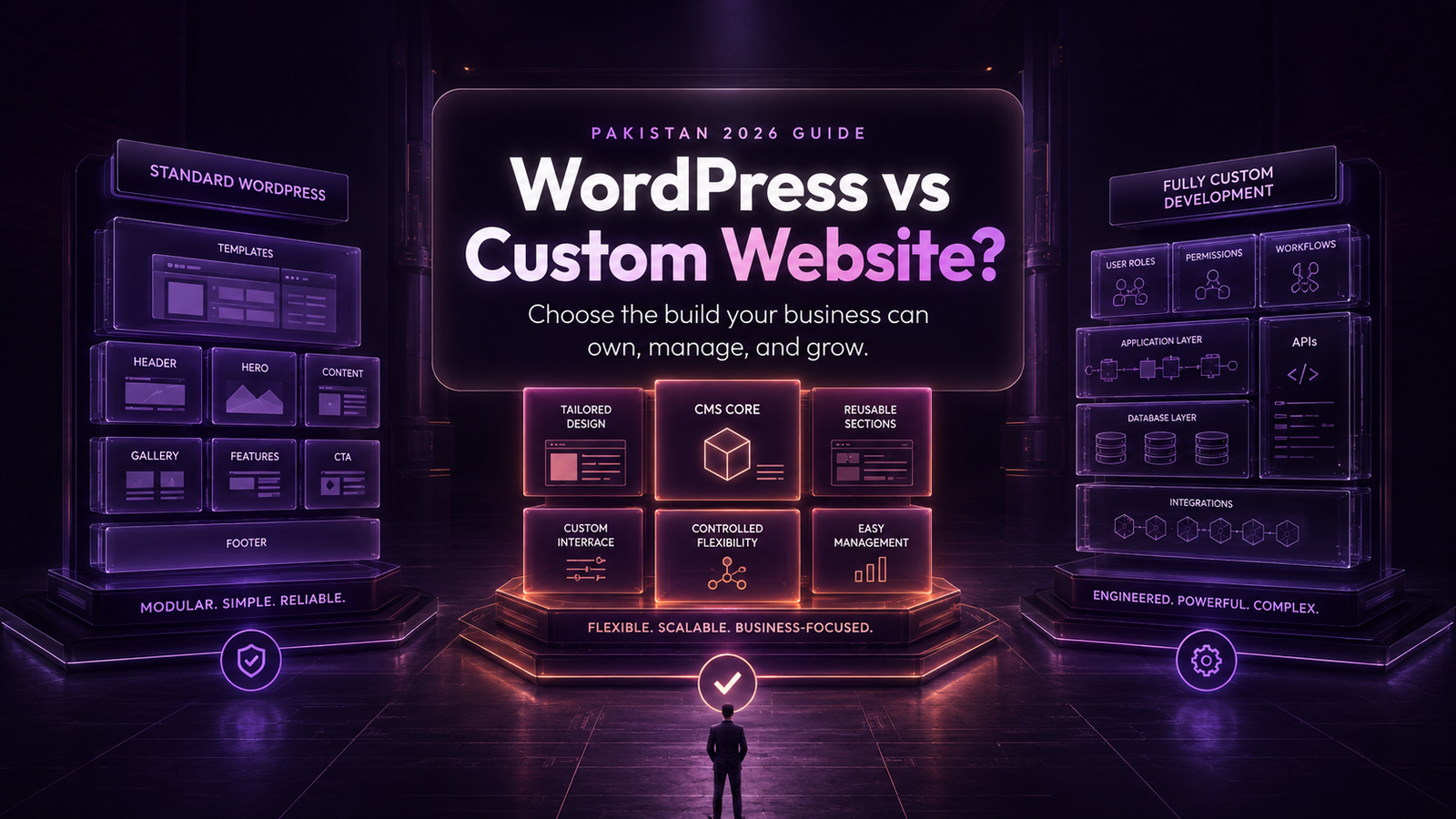
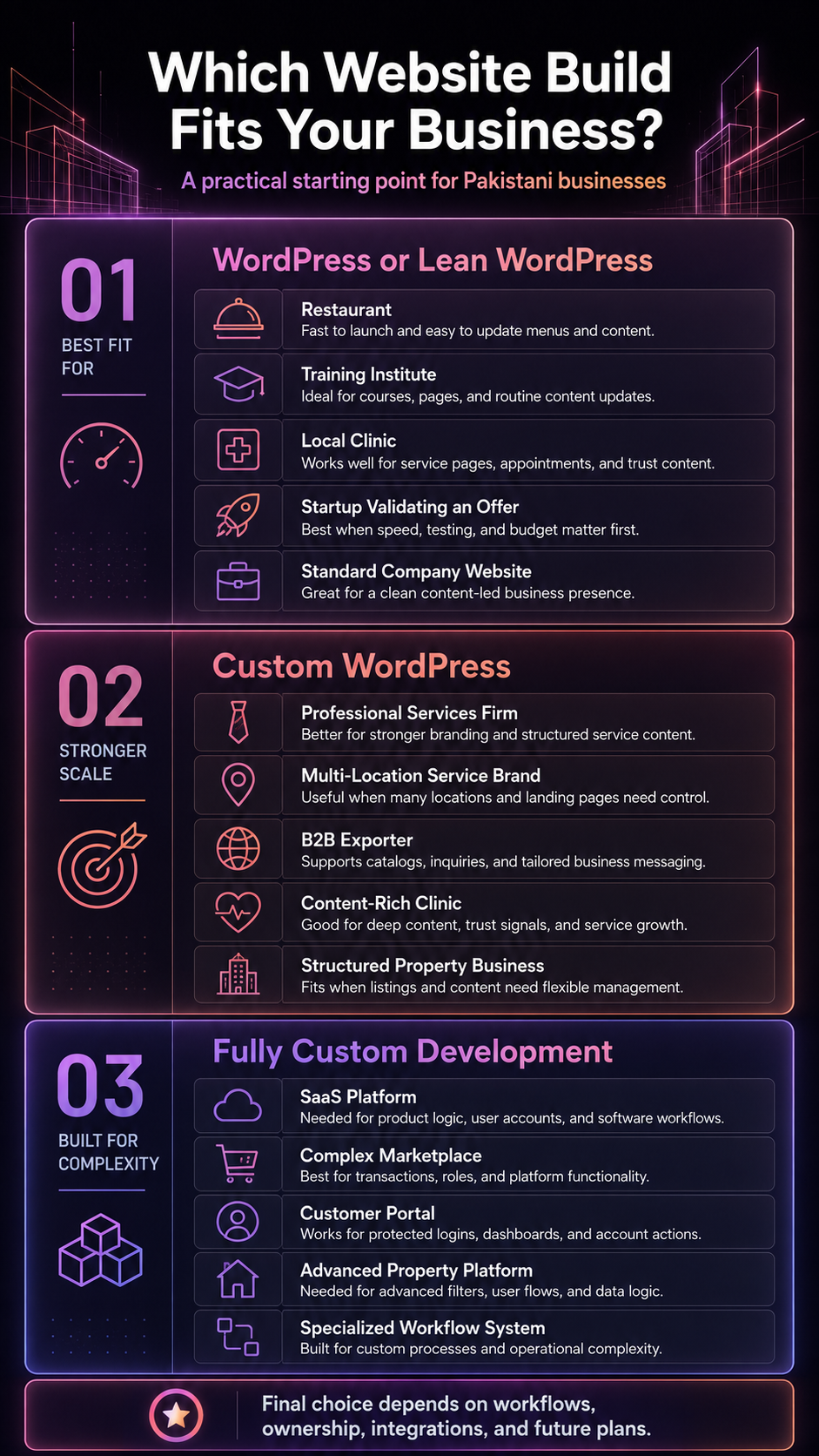
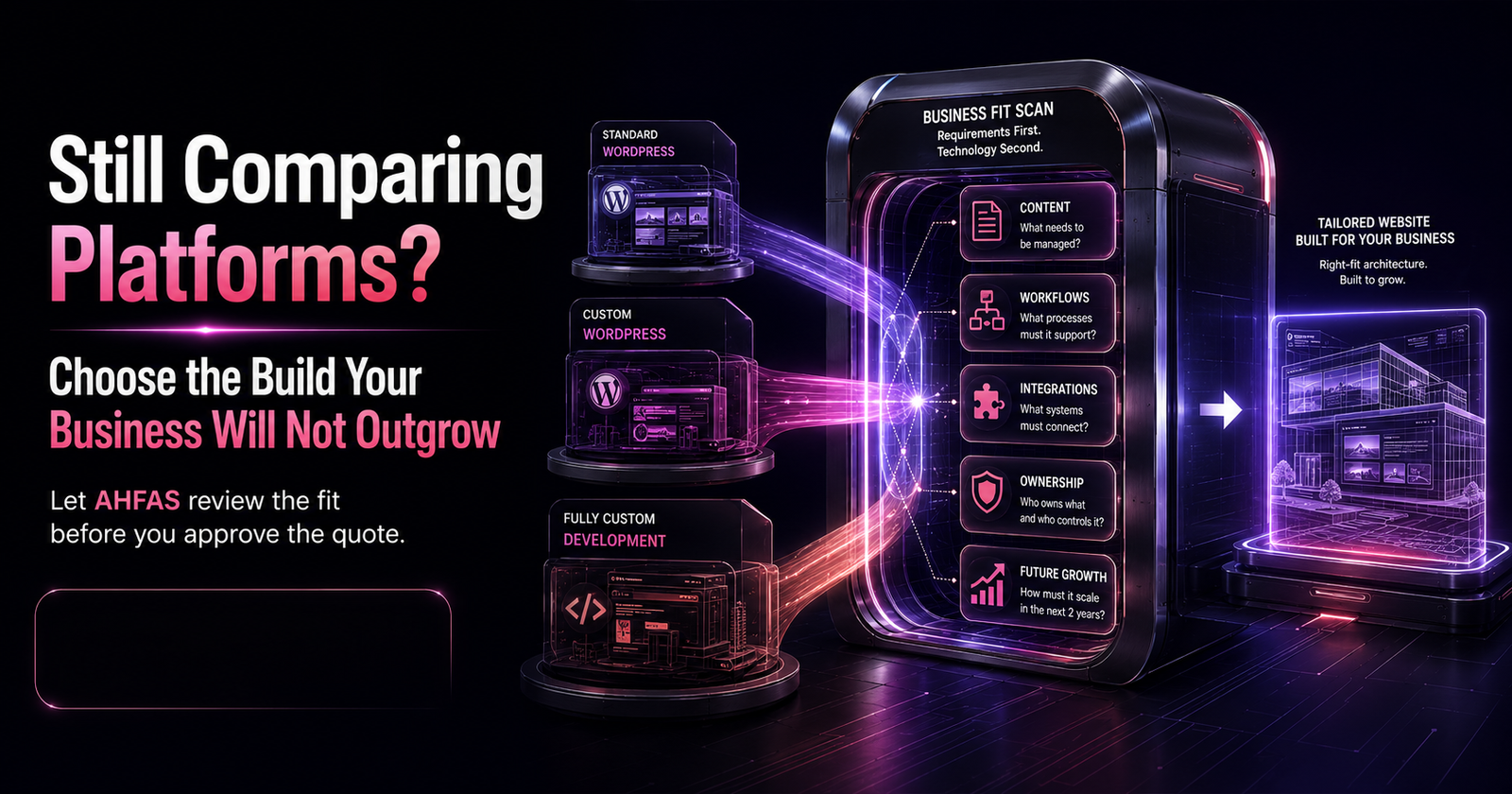
Choose WordPress when the business needs a content-led website that can launch efficiently and remain easy to manage. Choose fully custom development when the website requires specialised workflows, complex integrations, unusual data handling, or product-level functionality.
For many Pakistani businesses, the smartest option sits between those extremes: a custom-designed WordPress website built around the brand, content, customers, and future requirements.
The right platform is not the one that sounds most advanced. It is the one the business can operate, maintain, own, and grow without unnecessary technical debt.
Key Takeaways
- WordPress can support template websites, custom designs, ecommerce, portals, integrations, and structured content.
- Custom code makes sense when the website performs specialised business processes that standard platforms cannot handle cleanly.
- Neither option automatically wins on SEO, speed, security, or scalability.
- The initial quote rarely shows the full cost of ownership.
- Platform selection should follow business requirements, not the developer’s preferred technology.
Who Should Read This Guide?
This guide is for Pakistani startups, small businesses, ecommerce brands, clinics, real estate companies, educational institutes, B2B firms, professional service providers, and marketing teams planning a new website or redesign.
It will be especially useful when:
- Different Developers Recommend Completely Different Platforms
- One Proposal Is Much Cheaper But Unclear
- The Business Expects To Publish Content Regularly
- The Website Needs Bookings, Payments, Accounts, Or Integrations
- Staff Cannot Manage The Current Website
- The Business Is Worried About Performance, Ownership, Security, Or Maintenance
- Rebuilding Again In One Or Two Years Would Be Costly
WordPress Is Not Just a Template Builder
WordPress is a content management system, not a fixed design style. It can power a basic template website, a completely custom brand experience, an ecommerce store, a membership platform, a content hub, or a more advanced application.
As of July 2026, W3Techs reports that WordPress powers 41.5% of all websites and holds 59.2% of the market among websites with a known CMS. W3Techs updates this data daily. The figure does not prove WordPress is right for every project, but it confirms that the platform remains a major part of the modern web. (W3Techs)
The official WordPress feature documentation explains that WordPress supports everything from blogs and company websites to complex portals, enterprise websites, applications, custom content types, user management, plugins, and API-based development.
The useful question is not:
Is WordPress professional enough?
The useful question is:
Does WordPress fit what the website must do, who will manage it, and how the business expects it to grow?
What Does “Custom Website” Actually Mean?
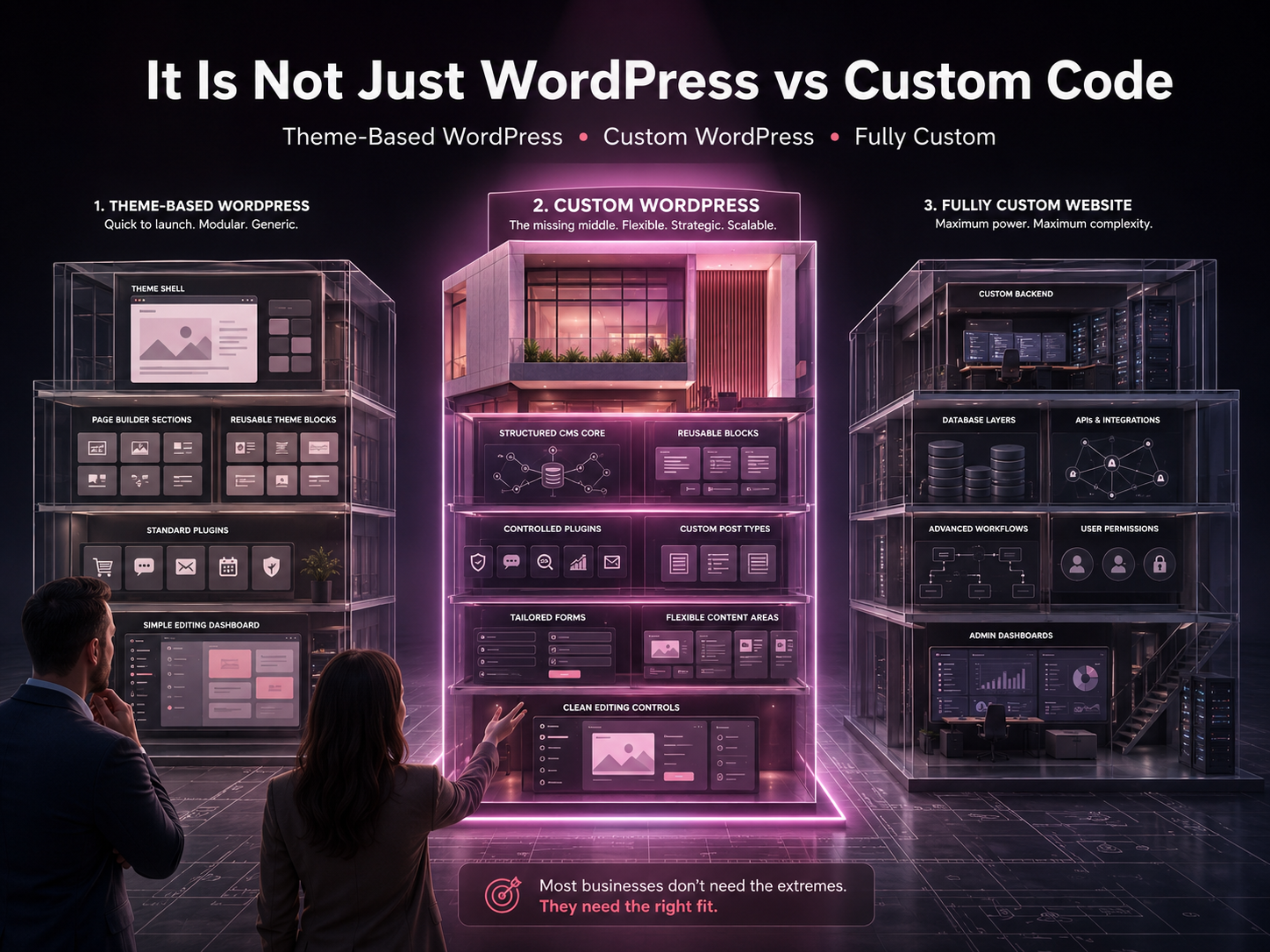
“Custom website” can describe several very different products. Pakistani businesses should clarify the definition before comparing quotes.
One developer may call a modified theme custom. Another may mean a unique WordPress theme. A third may mean a completely new application built with a custom front end, back end, database, and administration system.
The choice is easier when broken into three models.
1. Theme-Based WordPress Website
This option uses WordPress with an existing theme, page builder, and selected plugins. The developer adjusts colours, typography, layouts, content, and features.
It can suit:
- Early-Stage Businesses
- Small Service Websites
- Personal Brands
- Simple Company Websites
- Campaign Landing Pages
- Standard Blogs
- Businesses Validating An Offer
The model becomes risky when the build relies on a bloated theme, excessive plugins, poor hosting, weak mobile layouts, or a page builder that makes future editing difficult.
A theme-based build is not automatically bad. It becomes a problem when the theme dictates the business strategy instead of supporting it.
2. Custom WordPress Website
A custom WordPress website keeps WordPress as the CMS but builds the design and important functionality around the business.
It may include:
- A Custom Theme
- Original UI And UX
- Reusable Gutenberg Blocks
- Custom Post Types
- Custom Fields
- Structured Service Templates
- Controlled Plugin Use
- CRM Connections
- Custom Forms
- WooCommerce Modifications
- Location Or Team Management
- Tailored Mobile Layouts
This model gives staff a familiar editing dashboard without forcing the website to look or behave like an off-the-shelf template.
Businesses that need unique design with manageable content can explore custom WordPress theme development. The service covers tailored themes, responsive design, ecommerce support, performance work, SEO foundations, integrations, and ongoing maintenance considerations.
3. Fully Custom-Coded Website
A fully custom website is engineered around specific business requirements. The development team selects the front end, back end, database, APIs, hosting architecture, security controls, and content-management approach.
It is usually justified when the website functions more like software than a marketing website.
Common examples include:
- SaaS Products
- Customer Portals
- Custom Dashboards
- Complex Marketplaces
- Multi-Vendor Platforms
- Unusual Booking Engines
- Advanced Calculators
- Internal Workflow Systems
- Specialised Membership Platforms
- Real-Time Inventory Integrations
- Systems With Complex Permissions Or Sensitive Data
Custom development gives deeper control, but it also creates deeper responsibility. The business needs reliable engineering, testing, documentation, security planning, infrastructure management, and ongoing technical support.
WordPress vs Custom Website Comparison
| Decision Factor | Standard WordPress | Custom WordPress | Fully Custom Website |
| Best fit | Standard business and content websites | Unique branded websites with manageable content | Specialised products, portals, and workflows |
| Launch speed | Usually faster | Moderate | Usually longer |
| Initial cost | Often lower | Mid-range to higher | Usually highest |
| Content editing | Built-in dashboard | Tailored editing controls | Depends on the custom CMS or admin panel |
| Design control | Limited by theme and builder | High | Very high |
| Standard features | Strong plugin ecosystem | Plugins plus custom functionality | Built or integrated individually |
| Developer dependency | Low to moderate | Moderate | Often high |
| SEO potential | Strong when implemented properly | Strong when implemented properly | Strong when implemented properly |
| Performance potential | Good with disciplined development | Strong with controlled architecture | Strong with capable engineering |
| Complex workflows | Can become difficult | Suitable up to a point | Best for genuinely specialised systems |
| Maintenance | Core, theme, plugin, hosting, and backup work | Controlled WordPress maintenance | Code, dependencies, infrastructure, and application maintenance |
| Ownership risk | Depends on licences and access | Depends on contract and handover | Depends heavily on source-code and documentation terms |
Use the Website Fit Test Before Choosing
The platform should follow five business decisions.
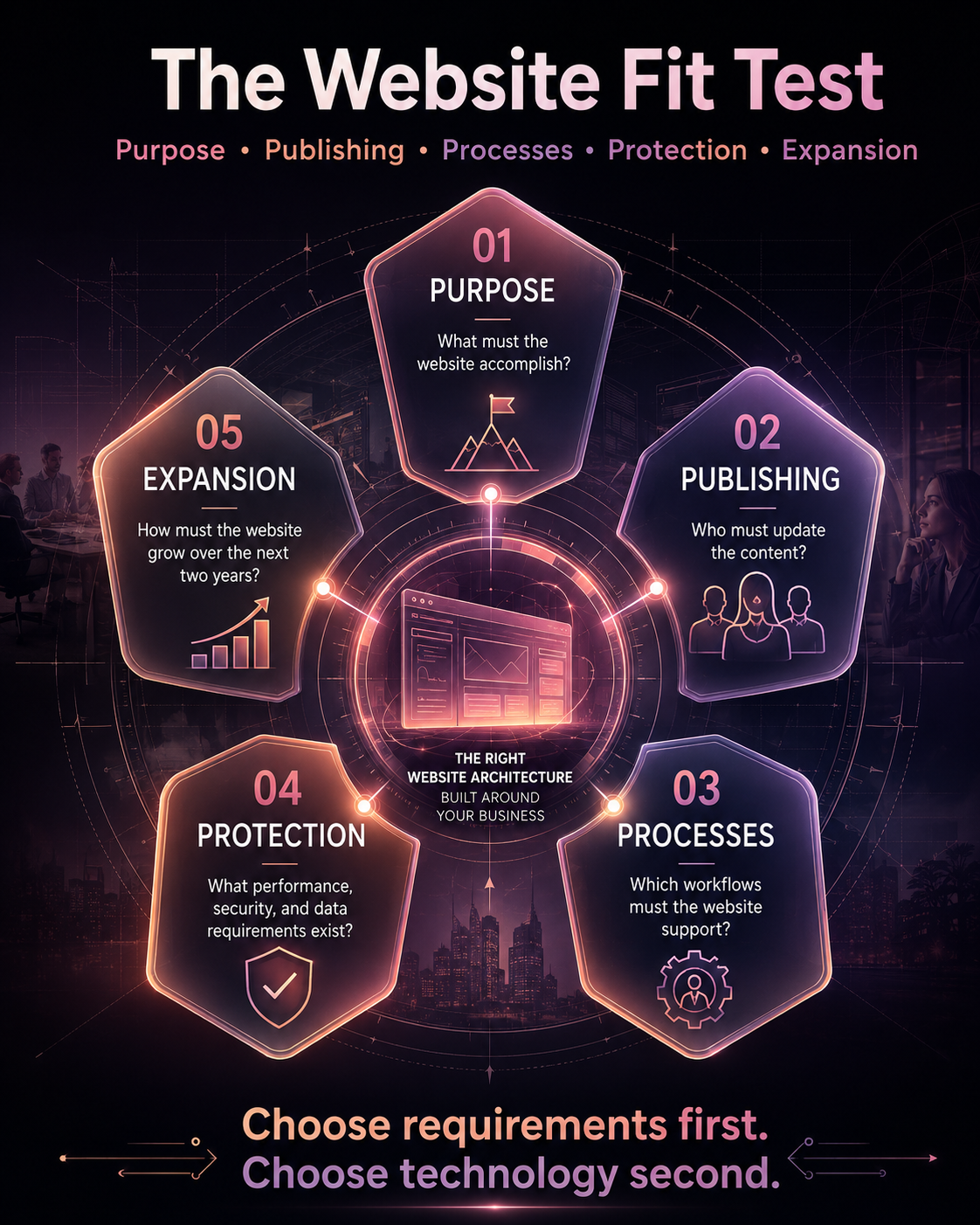
1. Purpose
Start with what the website must accomplish.
Is it mainly built to:
- Explain Services
- Generate Enquiries
- Publish Articles
- Sell Standard Products
- Manage Appointments
- Host Memberships
- Provide Customer Accounts
- Connect Buyers With Vendors
- Automate Internal Work
- Operate As A Software Product
A seven-page company website and a multi-vendor marketplace should not receive the same technical recommendation.
2. Publishing
Identify who will manage content after launch.
Will the team regularly update:
- Services
- Products
- Prices
- Team Members
- Blogs
- Case Studies
- Locations
- Offers
- Events
- Faqs
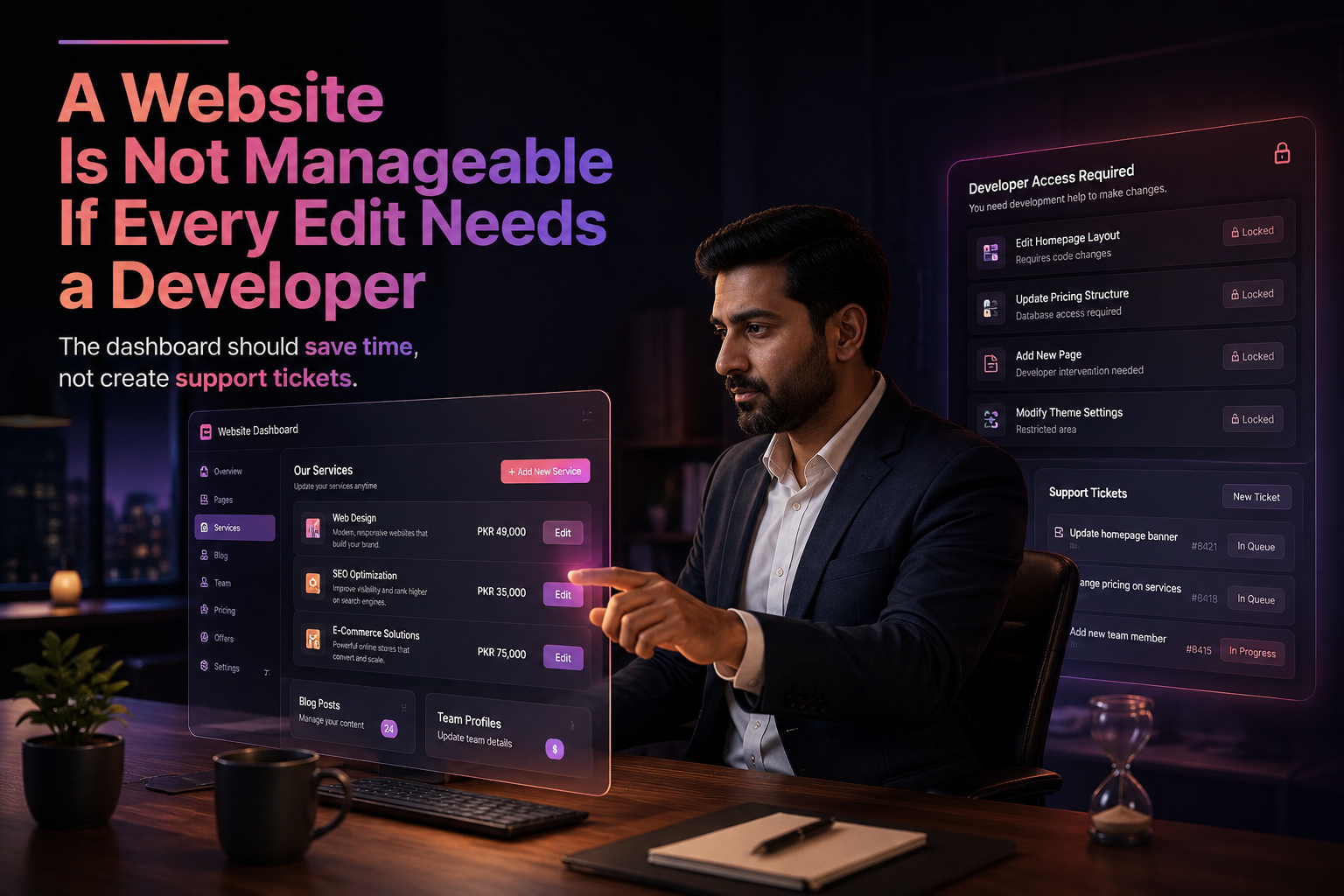
WordPress already provides publishing and user-management tools. A fully custom website needs its own CMS, admin panel, or continuing developer support.
A custom admin dashboard may sound impressive during a sales call. It is only useful if non-technical staff can use it without creating support tickets for every change.
3. Processes
List the workflows before discussing technology.
Ask:
- Will customers create accounts?
- Will users book appointments?
- Will pricing change based on selections?
- Does the website need multiple user roles?
- Will it connect to a CRM or ERP?
- Does it need advanced product filtering?
- Will users submit or retrieve data?
- Does the business require approval workflows?
- Will several systems exchange data in real time?
Standard forms, service pages, blogs, catalogues, and common booking tools rarely justify rebuilding every component from scratch.
Specialised workflows often do.
4. Performance and Protection
Define what speed and security mean for the project.
A local services website has different requirements from a financial portal, customer dashboard, healthcare system, or high-traffic marketplace.
Clarify:
- Expected Traffic
- Sensitive Data
- Login Requirements
- Payment Processing
- User Permissions
- Uptime Expectations
- Backup Frequency
- Monitoring Needs
- Regulatory Requirements
- Recovery Process
This prevents both underbuilding and unnecessary engineering.
5. Expansion and Economics
Look beyond launch day.
Ask:
- What features may be added in the next two years?
- Will the business add products, locations, or languages?
- Who will support the website?
- Can another team take over?
- Which licences renew annually?
- What happens if the original developer disappears?
- Can the site move to another host?
- What would migration cost?
- How quickly can staff publish changes?
This turns platform selection into a business decision rather than a technical preference.
When Is WordPress Enough?
WordPress is usually enough when the website mainly supports content, marketing, lead generation, standard ecommerce, bookings, or business information.
It is often a suitable choice for:
- Clinics
- Restaurants
- Educational Institutes
- Real Estate Agencies
- Accountants And Law Firms
- Consultants
- Local Service Companies
- Corporate Websites
- Blogs And Resource Centres
- Portfolios
- Multi-Location Websites
- Standard Membership Websites
- Small And Medium Woocommerce Stores
WordPress also works well when staff need to update content without involving a developer every week.
Its ecosystem can reduce the time required to implement common functionality. However, plugin selection should remain controlled. Installing more plugins than the project needs can introduce code weight, compatibility issues, maintenance work, and security exposure.
When Is Custom WordPress the Better Middle Path?
Custom WordPress often makes sense when the business needs a distinctive website but does not need a completely new software platform.
Consider it when:
- A Pre-Built Theme Cannot Support The Required Customer Journey
- The Website Needs Original Page Layouts
- Several Services Or Locations Require Structured Templates
- Editors Need Simple, Controlled Content Fields
- Unnecessary Theme Features Are Hurting Performance
- Woocommerce Requires Tailored Product Or Checkout Layouts
- The Brand Cannot Look Like A Recycled Template
- Selected Crm, Analytics, Or Marketing Integrations Are Required
- The Team Wants WordPress Publishing Without Page-Builder Chaos
This middle option is frequently missing from basic WordPress vs custom website comparisons.
The decision is not limited to cheap WordPress or expensive custom code. A custom WordPress build can combine original UI, structured content, business-specific functionality, and easier ongoing management.
When Is Fully Custom Development Justified?
Custom development makes sense when specialised business requirements would force a CMS into a role it cannot handle cleanly.
It may be justified when:
- The Website Is The Product
- Users Perform Complex Actions After Login
- Several Applications Exchange Data Continuously
- The Platform Requires Unusual Permissions
- Standard Ecommerce Logic Cannot Support The Sales Model
- Internal Processes Need Custom Approvals
- Users Generate Or Manage Significant Data
- The Platform Needs Custom Dashboards
- Web And Mobile Applications Share One Backend
- The Business Has Internal Technical Capacity
Custom code should solve a defined operational problem.
“Custom sounds more premium” is not a requirement.
Businesses considering this path can also review the practical custom website development benefits before deciding whether they need original software, a custom design, or simply a better-structured website.
Which Option Costs Less Over Time?
WordPress usually costs less to launch because the CMS, editor, user roles, APIs, themes, plugins, and publishing tools already exist.
Custom development may require the team to design or engineer many of those systems.
That does not mean the cheapest WordPress quote offers the lowest long-term cost.
Hidden WordPress Costs Can Include
- Premium Theme Renewals
- Plugin Subscriptions
- Hosting Upgrades
- Compatibility Fixes
- Page-Builder Limitations
- Performance Repairs
- Security Monitoring
- Backup Services
- Developer Support
- An Early Redesign
Hidden Custom Website Costs Can Include
- Discovery And Planning
- Admin-Panel Development
- Backend Engineering
- Testing And Quality Assurance
- Security Reviews
- Server Configuration
- Monitoring
- Framework Updates
- Dependency Maintenance
- Documentation
- Ongoing Developer Retainers
The right comparison is total cost of ownership, not the first invoice.
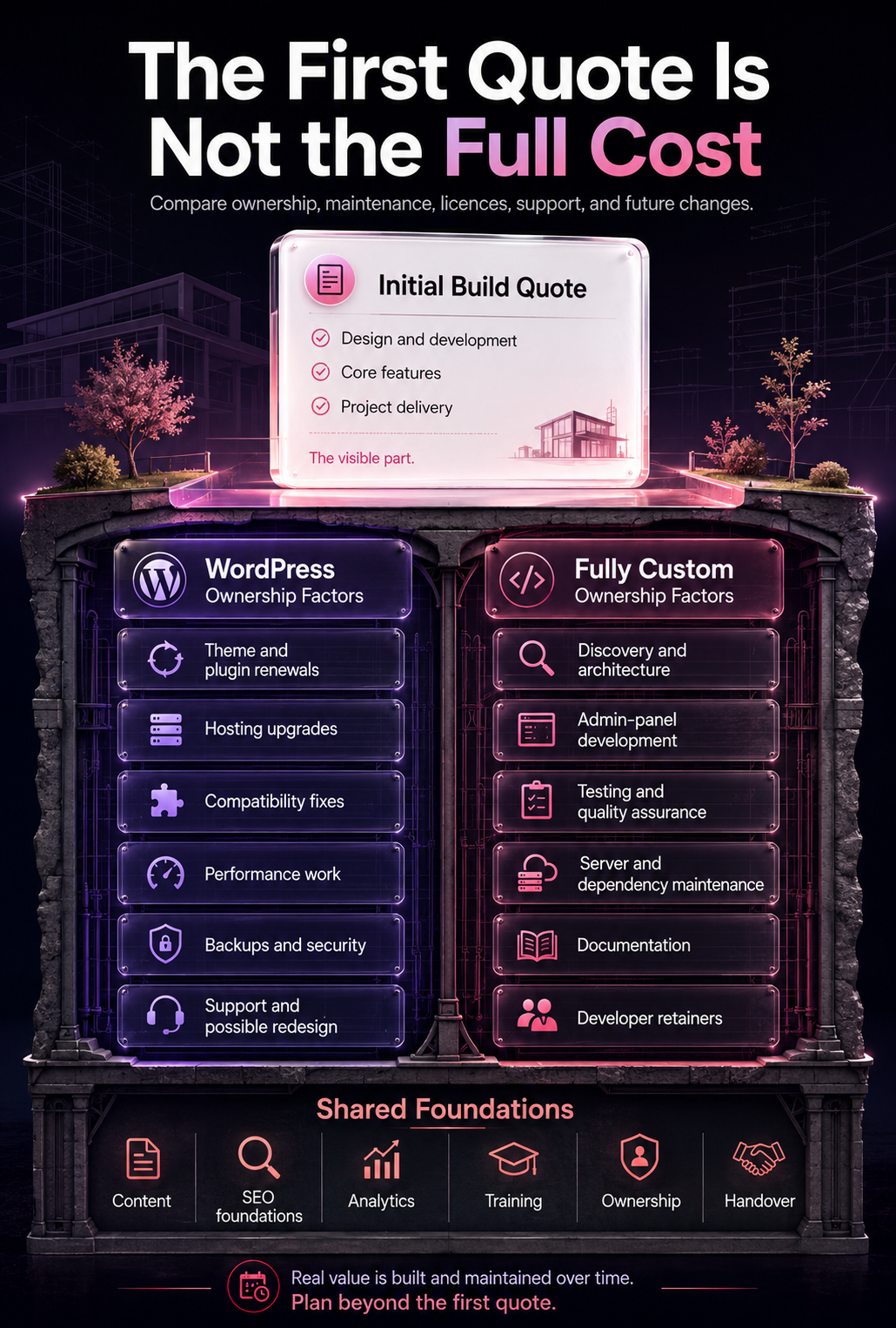
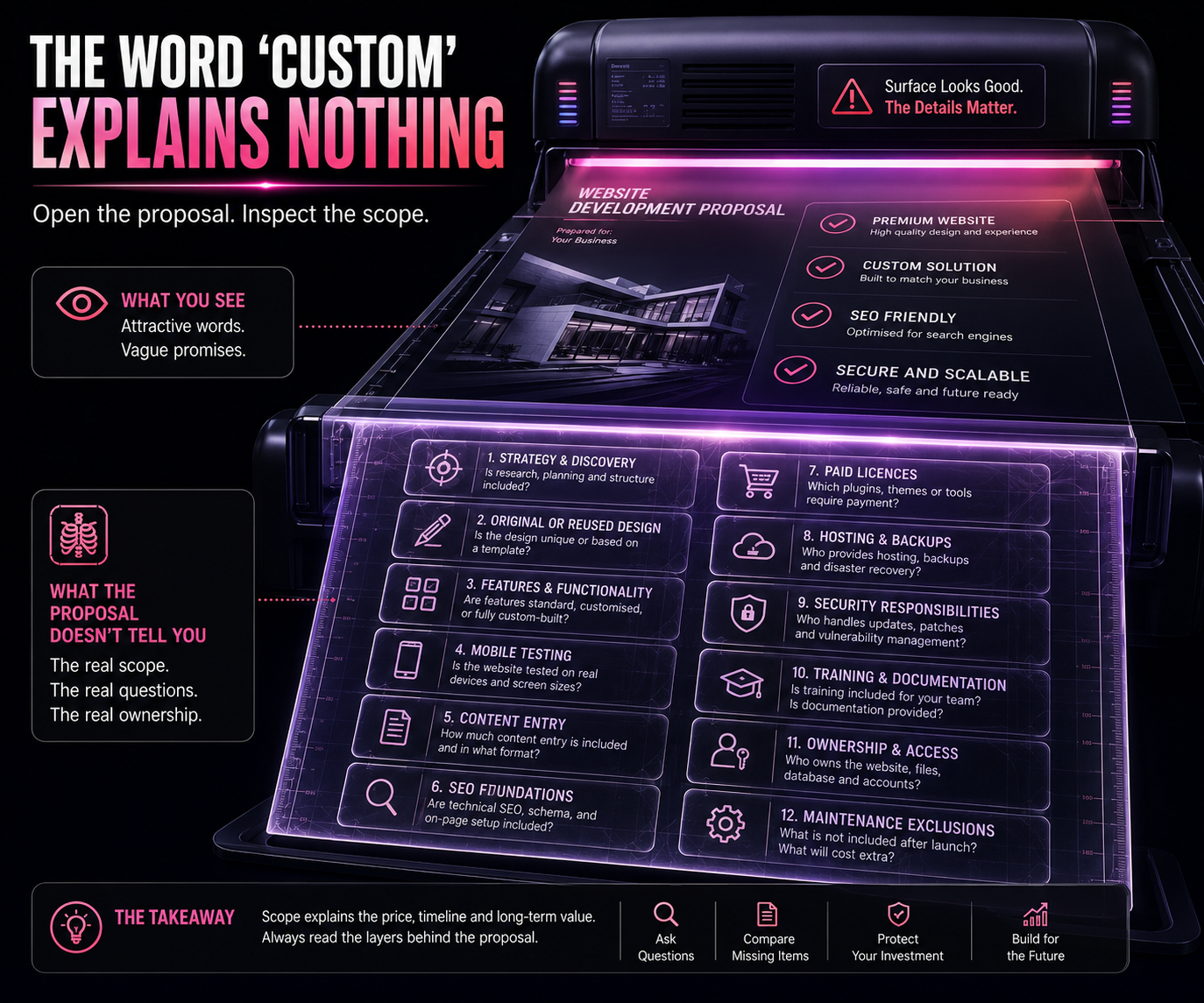
A clear proposal should separate:
- Strategy And Discovery
- Design
- Development
- Content Entry
- Integrations
- Hosting And Infrastructure
- Paid Software Or Licences
- Testing
- SEO Foundations
- Maintenance And Support
- Future Feature Rates
- Ownership And Handover
Is WordPress or Custom Code Better for SEO?
Neither platform receives an automatic ranking advantage.
Google does not rank a website higher simply because it uses WordPress, Laravel, React, Next.js, PHP, or another technology.
Search performance depends on whether the website provides:
- Crawlable Content
- Indexable Pages
- Clear Site Architecture
- Helpful Service And Product Information
- Appropriate Metadata
- Strong Internal Linking
- Mobile Usability
- Sensible URL Structures
- Structured Data Where Relevant
- Fast And Stable User Experiences
- Pages Aligned With Search Intent
Google’s current guidance for generative AI features in Search says foundational SEO remains relevant because AI Overviews and AI Mode rely on Google’s core ranking and quality systems. Google recommends valuable content, clear technical structure, crawlability, accurate business information, and useful media rather than separate tricks for AI search.
WordPress can support metadata, XML sitemaps, canonical tags, structured data, internal links, clean URLs, redirects, image alt text, service pages, and blogs.
Custom websites can support the same requirements, but developers must plan and build the necessary controls.
SEO problems usually appear when:
- Important Content Loads Only Through Problematic Javascript
- Metadata Cannot Be Edited
- Pages Are Accidentally Blocked From Crawling
- URLs Change Without Redirects
- Headings Are Used Incorrectly
- Valuable Content Disappears During Redesign
- Internal Links Are Weak
- The CMS Makes Publishing Difficult
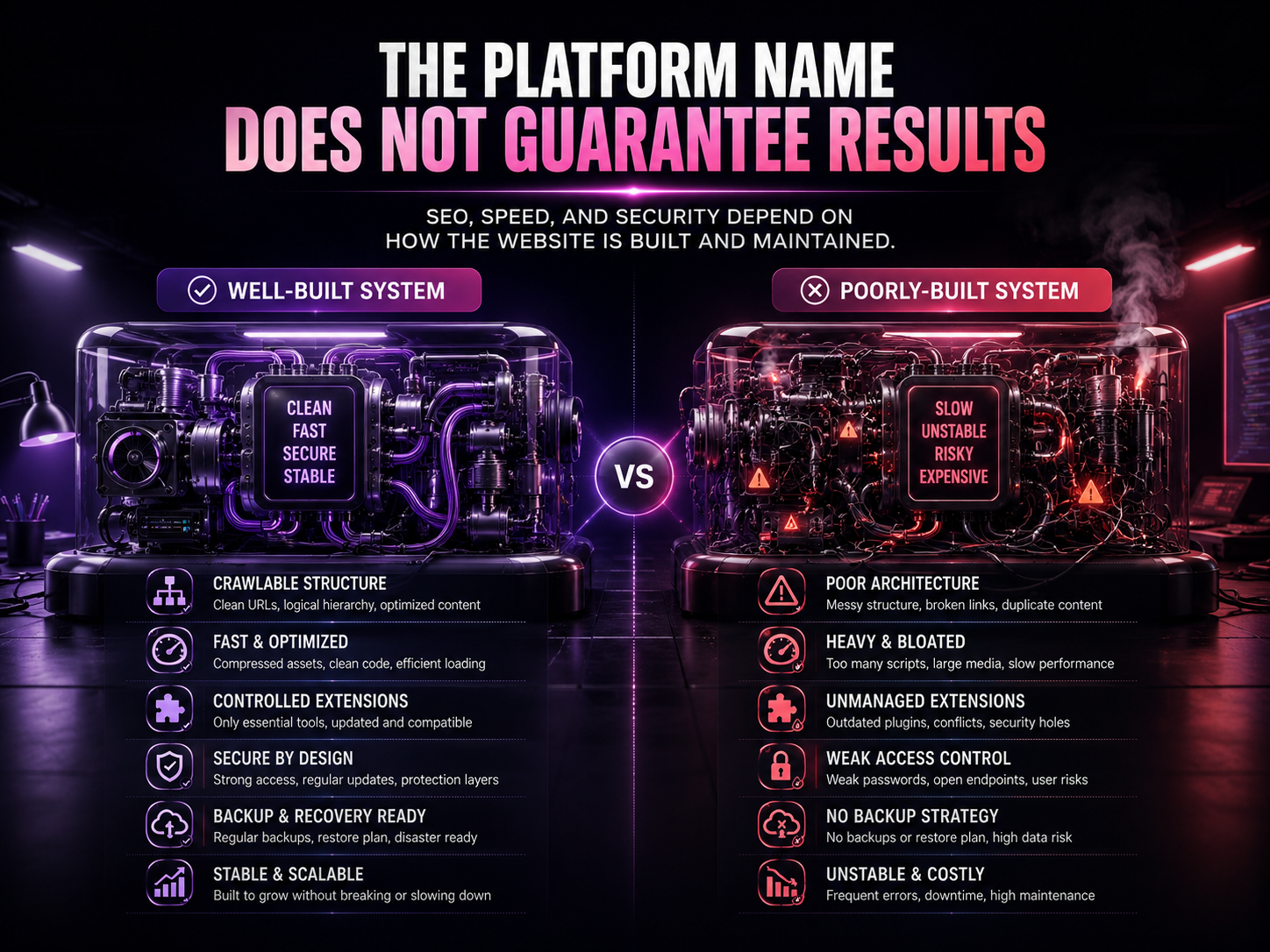
Platform choice matters. Implementation quality matters more.
Which Option Is Faster?
Either option can be fast. Either option can be slow.
A lean WordPress website with suitable hosting, caching, compressed images, controlled plugins, and clean development can outperform poor custom code.
Custom development can offer tighter control over code, rendering, database queries, scripts, and infrastructure. That advantage disappears when the team ships oversized JavaScript, inefficient database requests, heavy third-party tools, or poorly compressed media.
Google’s Core Web Vitals documentation measures real-world loading, responsiveness, and visual stability. These metrics reflect the experience users receive, not the platform name written in the proposal.
Before accepting a speed claim, ask:
- Will testing cover mobile devices?
- Will the provider use real-user data after launch?
- Which scripts will be added?
- Who will compress and size images?
- What hosting environment is recommended?
- How will third-party tools affect performance?
- What happens when performance drops after future updates?
Which Option Is More Secure?
Neither WordPress nor custom code is automatically secure.
WordPress security requires:
- Current Core Software
- Maintained Themes And Plugins
- Strong Passwords
- Controlled Administrator Access
- HTTPS
- Secure Hosting
- Backups
- Monitoring
- Sensible Permissions
- Regular Maintenance
Official WordPress security guidance recommends keeping WordPress, themes, and plugins current while managing the hosting environment, file permissions, user roles, monitoring, and recovery planning.
Custom software removes dependence on mass-market themes and plugins, but it introduces other responsibilities. Developers must secure authentication, APIs, permissions, databases, dependencies, servers, logging, data flows, and deployment systems.
The OWASP Secure by Design Framework recommends building security requirements into the architecture before coding begins. OWASP also provides tools for identifying known vulnerabilities in software dependencies, which confirms that custom applications still rely on components that need monitoring and updates.
Custom code is more secure only when the team designs, tests, monitors, and maintains it securely.
Which Option Is Easier to Maintain?
WordPress makes maintenance visible through core, theme, and plugin updates.
Custom websites also require maintenance, even when no update notification appears.
A custom build may need:
- Framework Updates
- Server Patches
- Database Work
- Dependency Updates
- Api Compatibility Changes
- Browser Testing
- Infrastructure Monitoring
- Performance Reviews
- Security Testing
- Documentation Updates
WordPress websites need complete backups of both files and the database. Official WordPress backup guidance explains that reliable restoration requires the content database as well as themes, plugins, uploads, configuration, and other site files.
The practical question is not:
Which website requires no maintenance?
The answer is none.
Ask instead:
What maintenance will be required, who will perform it, how often will it happen, and how quickly will problems be resolved?
Can WordPress Scale With a Growing Business?
Yes, WordPress can scale for many publishing, ecommerce, service, membership, and multi-location websites.
The word “scale” needs context.
Growth may mean:
- More Pages
- More Articles
- More Traffic
- More Products
- More Locations
- More Editors
- More Languages
- More Integrations
- More Logged-In Users
- More Complex Transactions
- More Operational Workflows
WordPress can support substantial content and traffic with appropriate hosting, caching, database work, development, and infrastructure.
Custom architecture becomes more attractive when operational complexity, not merely website size, becomes the main challenge.
What Should Different Pakistani Businesses Choose?
| Business Type | Likely Best Starting Point | Reason |
| Local clinic | WordPress or custom WordPress | Services, doctors, locations, blogs, forms, appointments |
| Restaurant | WordPress | Menu, location, reservations, offers, and updates |
| Training institute | WordPress | Courses, admissions, content, forms, and branches |
| Professional services firm | Custom WordPress | Strong branding, service pages, proof, and content |
| Real estate agency | Custom WordPress or custom | Depends on feeds, filters, portals, and integrations |
| Small ecommerce store | WooCommerce or suitable ecommerce platform | Standard product, payment, and checkout requirements |
| Complex marketplace | Custom development | Vendors, commissions, roles, workflows, and data |
| SaaS company | Custom development | The platform itself is the product |
| Startup testing an offer | Lean WordPress or MVP | Faster validation before major engineering |
| B2B exporter | Custom WordPress or custom | International content, lead journeys, and integrations |
| Customer portal | Custom development | Accounts, data, permissions, and private functionality |
| Multi-location service brand | Custom WordPress | Structured locations, services, content, and editing |
What Most Pakistani Businesses Get Wrong
They Choose Technology Before Requirements
The developer recommends the technology they already know. The client accepts because the explanation sounds technical.
The process should begin with users, content, workflows, integrations, editing needs, ownership, and future plans.
They Confuse Custom Design With Custom Software
A website can have an original design while still using WordPress.
Building a custom backend makes little sense when the actual requirement is better branding, page structure, UX, and content control.
They Compare Only the First Quote
A low quote may exclude mobile testing, content entry, SEO foundations, paid licences, backups, analytics, training, maintenance, security, and ownership transfer.
A high quote may include unnecessary architecture.
Scope explains price better than the word “custom.”
They Ignore the Editing Experience
A visually impressive website becomes a burden when staff cannot update services, products, blogs, locations, or offers.
The provider should demonstrate the content-editing process before approval.
They Forget Ownership
Some businesses discover too late that the developer controls the domain, hosting, theme licence, plugin accounts, analytics, administrator login, or source-code repository.
Ownership should be documented before development starts.
They Treat Launch as the Finish Line
Websites require monitoring, backups, security work, content improvement, performance checks, and software maintenance after launch.
No platform compensates for an absent support plan.
What Should You Fix First on an Existing Website?
Do not rebuild automatically. Diagnose the limitation first.
| Current Problem | Likely Cause | What to Fix First |
| Website is slow | Hosting, media, scripts, theme, plugins, or code | Run mobile and field performance diagnostics |
| Staff cannot edit pages | Poor CMS setup or confusing controls | Improve the editing system |
| Plugins keep conflicting | Weak plugin selection or outdated build | Audit and consolidate plugins |
| Every change needs a developer | Rigid architecture or missing CMS | Add manageable content controls |
| Website cannot support an important workflow | Platform mismatch | Scope the workflow before rebuilding |
| Rankings dropped after redesign | URL, content, crawl, or redirect issues | Complete an SEO migration audit |
| Website looks generic | Theme-led design | Consider a custom theme or redesign |
| Security problems keep returning | Weak updates, hosting, access, or monitoring | Complete a security review |
| Business has outgrown the system | New operational complexity | Compare extension, migration, and rebuild costs |
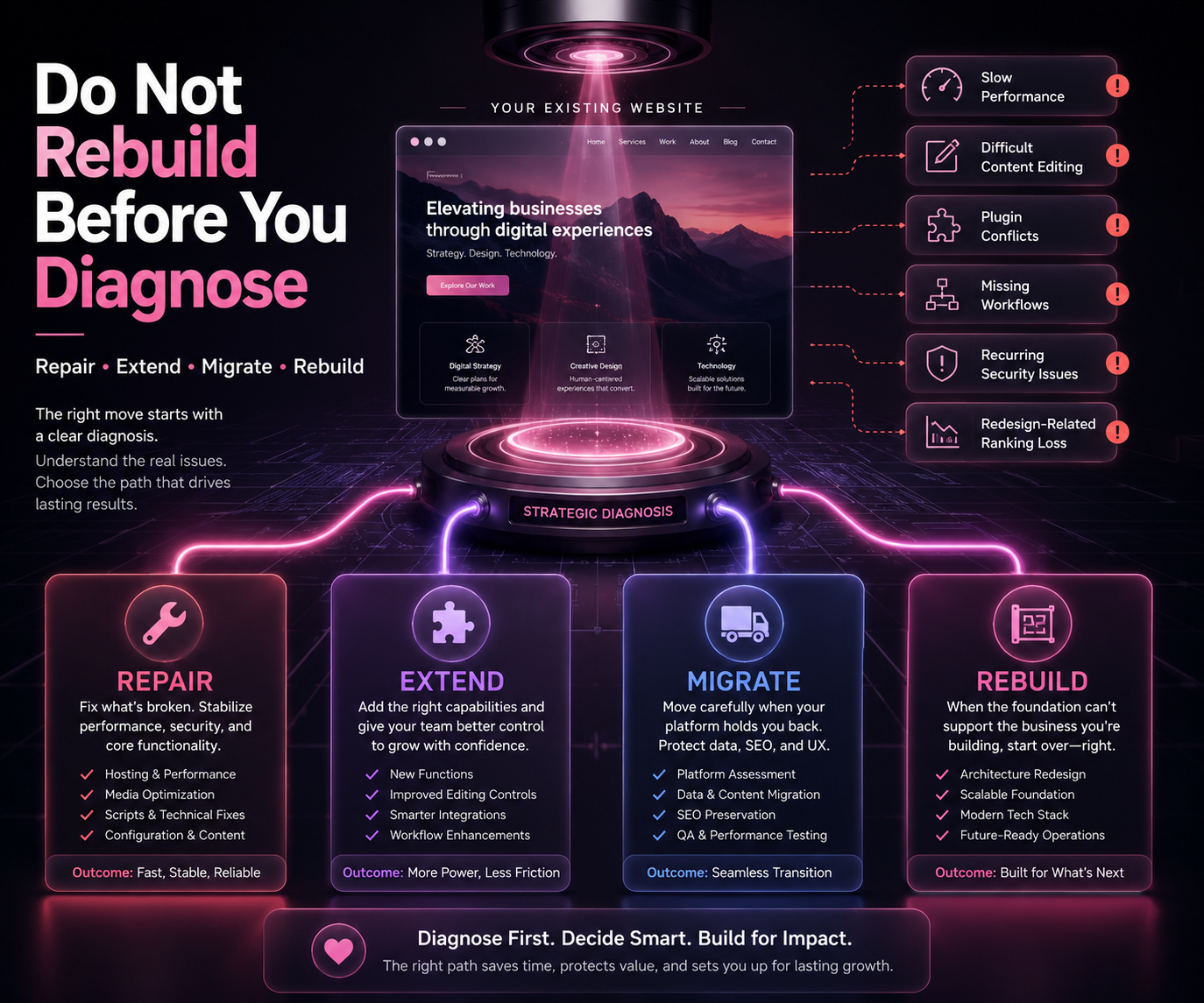
Optimisation may solve the real problem without a risky migration.
Replacing a functional WordPress website with custom code simply because custom sounds more professional can waste budget and create new dependencies.
Website Ownership and Handover Checklist
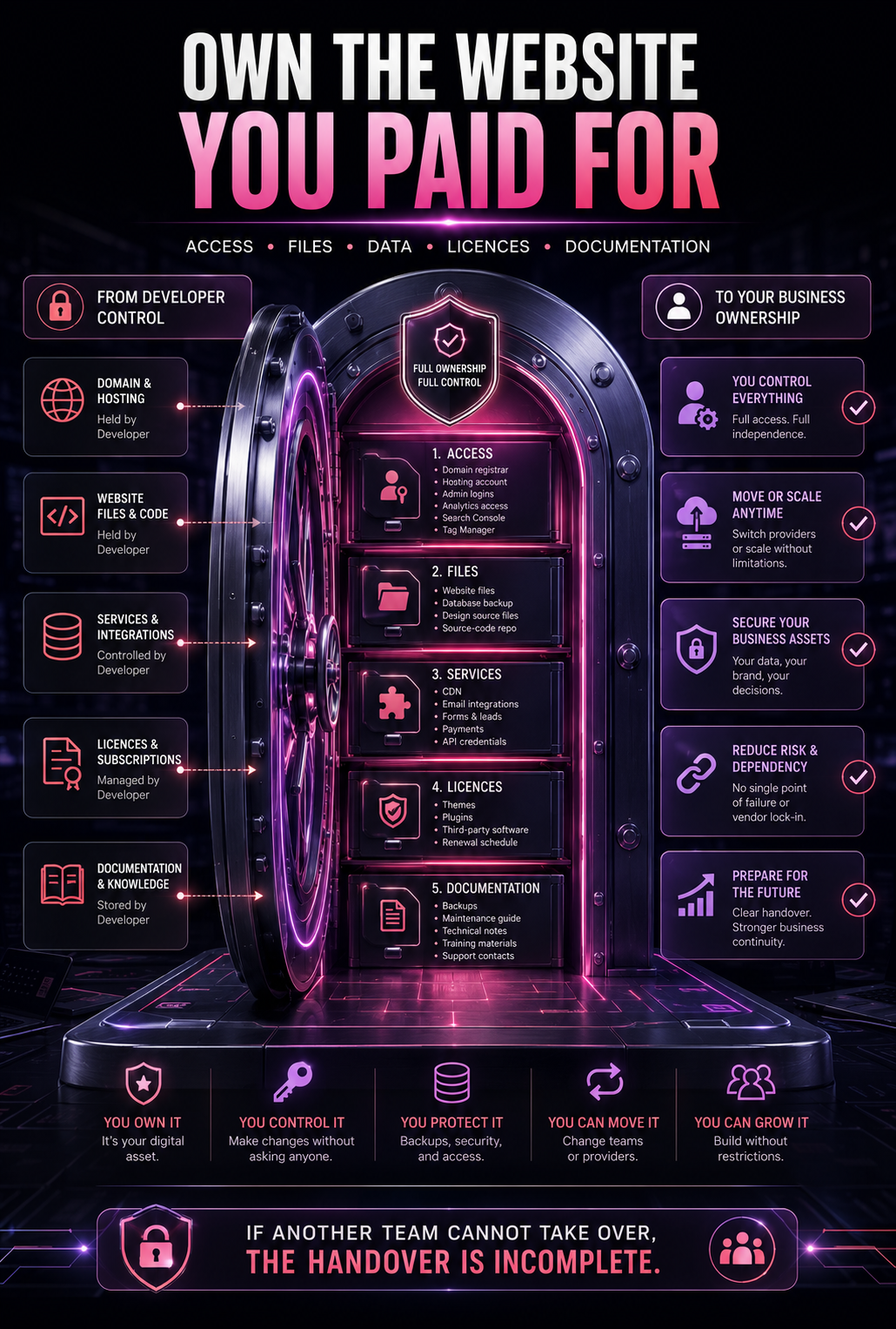
Before final payment, confirm access to:
- Domain Registrar
- Hosting Account
- WordPress Admin Or Custom Admin
- Source-Code Repository
- Database
- Website Files
- Premium Theme And Plugin Licences
- Analytics
- Google Search Console
- Tag Manager
- CDN
- Form And Email Integrations
- Payment Gateway Accounts
- Backup System
- Transferable Api Credentials
- Design Source Files
- Technical Documentation
- Maintenance Instructions
- Renewal Schedule
- Support Contacts
The contract should also clarify:
- who owns custom code
- whether third-party licences can transfer
- whether another developer can maintain the website
- how backups will be delivered
- what happens when the agreement ends
- which services continue after launch
- what future work will cost
Questions to Ask Before Accepting a Proposal
- Why does this platform fit our business requirements?
- Which features are standard, customised, or built from scratch?
- Can our staff update normal content without a developer?
- Which licences renew annually?
- Who owns the domain, hosting, code, and administrator accounts?
- What happens if the original developer becomes unavailable?
- How will mobile usability be tested?
- Which SEO foundations are included?
- How will speed be tested before and after launch?
- What security controls and backups are included?
- What maintenance will the website require?
- What is excluded from the quote?
- How will future features be priced?
- Will staging, documentation, training, and handover be provided?
- How will URLs and rankings be protected during migration?
When Should You Get Professional Help?
Professional guidance becomes useful when requirements are unclear, proposals are difficult to compare, the current site is limiting content or conversions, or the business cannot decide between improving WordPress, building a custom theme, or starting again.
Professional website development support can cover WordPress, custom websites, ecommerce, responsive design, UX and UI, performance, security, and SEO-ready foundations. The correct starting point is the customer journey and functional scope, not a platform selected before discovery.
Businesses can also explore recent website and brand work before comparing design quality, clarity, structure, and project fit.
Conclusion
The WordPress vs custom website decision is not a battle between a cheap platform and a premium platform.
WordPress is often the practical choice for websites built around content, leads, standard ecommerce, bookings, and regular updates.
Custom WordPress offers a valuable middle path when a business needs original design, cleaner structure, tailored functionality, and easier content management.
Fully custom development earns its cost when the project requires specialised workflows, data, permissions, integrations, or software-level functionality.
Before choosing, ask which option:
- Supports The Customer Journey
- Gives Staff The Right Editing Control
- Fits The Real Security Requirements
- Provides Clear Ownership
- Can Be Maintained By The Available Team
- Avoids Unnecessary Complexity
- Can Grow Without Forcing An Early Rebuild
The right technology should make the business easier to operate. It should not merely make the proposal sound more advanced.
Ready to Choose the Right Website Build?
AHFAS Technology can review your goals, required features, current platform, content needs, ownership risks, SEO requirements, and future plans before recommending WordPress, custom WordPress, or fully custom development.
Request a website platform fit review or email info@ahfastechnology.com before paying for functionality your business does not need or accepting a build it may quickly outgrow.
Frequently Asked Questions
1. What Is the Main Difference Between WordPress and a Custom Website?
WordPress provides an established CMS, publishing tools, user roles, themes, plugins, and APIs. A fully custom website is engineered around specific requirements using a selected front end, backend, database, integrations, and administration system.
2. Is WordPress Good for Pakistani Small Businesses?
Yes. WordPress can suit service businesses, clinics, institutes, restaurants, property companies, blogs, and standard ecommerce stores. Build quality, hosting, plugin control, mobile usability, security, and maintenance matter more than the platform label.
3. Is a Custom Website Better for SEO Than WordPress?
No platform receives an automatic SEO advantage. Both can perform well when pages are crawlable, useful, structured clearly, mobile-friendly, fast, internally linked, and aligned with search intent.
4. Is Custom Code More Secure Than WordPress?
Not automatically. WordPress requires careful updates, hosting, access control, backups, and plugin management. Custom software requires secure architecture, dependency maintenance, testing, monitoring, authentication controls, and ongoing engineering support.
5. Can WordPress Handle Ecommerce?
Yes. WordPress with WooCommerce can support many small and medium ecommerce stores. Custom development becomes more relevant when the business needs unusual checkout rules, advanced marketplace functions, complex inventory workflows, or specialised integrations.
6. Can a WordPress Website Be Completely Custom Designed?
Yes. Developers can create a custom WordPress theme, original page layouts, reusable content blocks, custom post types, integrations, and tailored functionality while keeping WordPress as the content-management system.
7. How Can a Business Tell If It Has Outgrown WordPress?
WordPress may no longer fit when essential workflows require too many workarounds, permissions become unusually complex, performance remains unstable after proper engineering, or the website has developed into a specialised software product.
8. What Should Pakistani Businesses Choose in 2026?
Choose WordPress for manageable content-led websites, custom WordPress for distinctive branded websites with tailored features, and fully custom development for specialised platforms and workflows. Base the choice on purpose, complexity, ownership, maintenance, and total cost.